AI Comment Moderation: A Complete Guide for Websites and Blogs
A blog post goes live, and by the next morning it has 40 new comments. A few are thoughtful questions from readers. Others contain promotional links to unrelated products, the same message posted five times, or personal attacks aimed at other commenters. Checking each one by hand is manageable at first, but it quickly becomes a daily chore as traffic grows.
This is where AI comment moderation helps. Instead of reading every submission yourself, an automated system reviews comments as they arrive, filters out obvious spam and abuse, and sends only the uncertain cases to a person.
In this guide, you will learn what AI comment moderation is, how it works, what it can detect, and how it compares with manual and rule-based methods. You will also find practical steps to set it up on your website, ways to measure whether it is working, and guidance on where human review is still necessary.
What Is AI Comment Moderation?
AI comment moderation is the use of machine learning models to automatically review user comments and decide whether they should be published, held for review, or rejected. It analyzes the text, links, and behavior behind each comment to identify spam, abuse, and other content that breaks a site's rules.
Unlike a simple keyword filter, an AI system does not rely only on a fixed list of banned words. It learns patterns from large sets of labeled examples, so it can recognize a spam message even when the wording changes, or tell the difference between a heated but fair disagreement and a direct insult. Many systems return a score or a label, such as "spam" or "likely toxic," which the website then uses to decide what happens next.
AI comment moderation is usually built into a commenting platform or added through a third-party service. For example, Hyvor Talk runs its moderation rules first, then sends comments to Akismet, a machine learning spam detection service, by default, with HYVOR's own FortGuard available as an alternative. Services such as Google's Perspective API have also been used to score comments for toxicity. In most setups, AI handles the first pass and a human moderator handles the cases the system is unsure about.
How Does AI Comment Moderation Work?
AI comment moderation works by checking each new comment against a trained model and a set of site rules before it appears on the page. The model scores or labels the comment, and the rules decide whether it is published, held for review, or blocked.
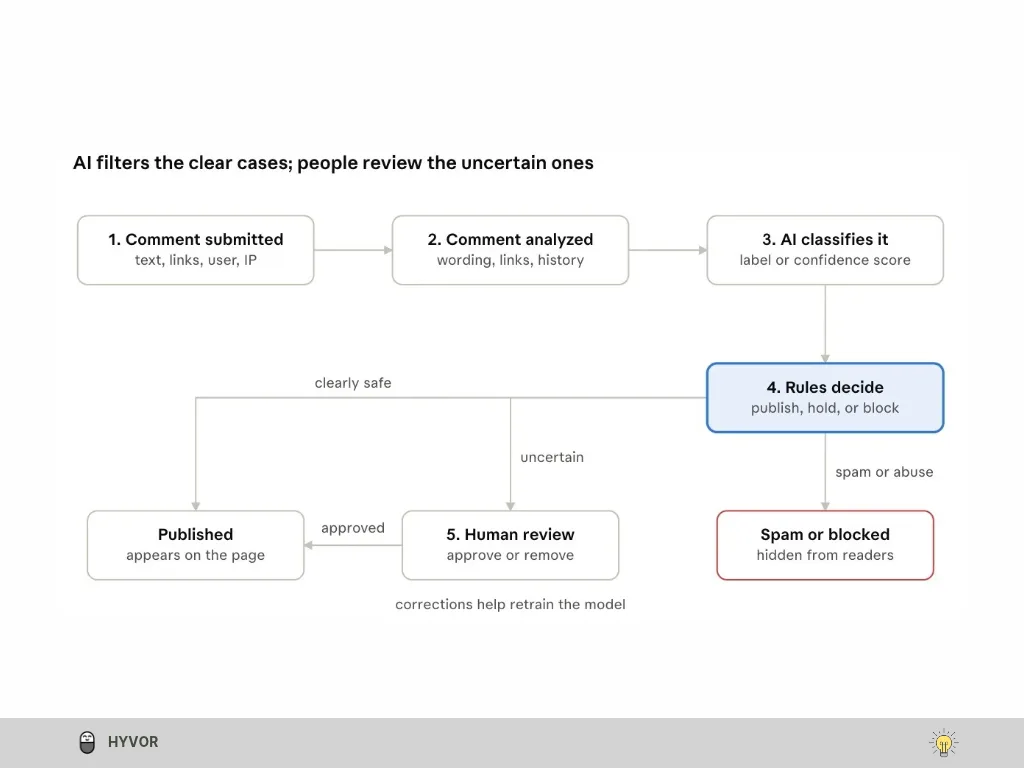
Clear-cut comments are published or blocked automatically; only uncertain ones reach a human moderator.
1. A User Submits a Comment
The process starts when a visitor writes a comment and clicks submit. Along with the text, the commenting system usually collects context such as the commenter's name, email, IP address, account status, and the page the comment was posted on.
2. The System Analyzes the Comment
The comment and its context are sent to the moderation engine for analysis. The system examines the wording, the number and type of links, how quickly the comment was submitted, and whether similar text has appeared before. Some services also check the IP address or account history for signs of known spam activity.
3. AI Classifies the Comment
The AI model compares the comment with patterns it learned from large sets of labeled examples. It then returns a label, such as spam or not spam, or a confidence score for categories like toxicity or harassment. A score of 0.92 for toxicity, for example, means the model is highly confident the comment is abusive.
4. Moderation Rules Determine the Next Action
The website's moderation settings turn that label or score into an action. A clear spam result might be sent straight to a spam folder, a high toxicity score might be blocked, and a borderline result might be held in a queue. Rules can also give trusted users a bypass, so regular commenters are not slowed down.
5. Human Moderators Review Uncertain Comments
Comments the system cannot classify with confidence are placed in a moderation queue for a person to check. The moderator approves, edits, or removes them. In many tools, these decisions are also fed back to the model so it makes fewer of the same mistakes in the future.
What Types of Comments Can AI Moderation Detect?
AI moderation can examine both the content of a comment and the behavior around it, such as links, timing, and repetition. This lets it catch everything from automated spam to abusive language aimed at other readers.
Comment type | Example or behavior | Possible moderation action |
|---|---|---|
Promotional spam | "Great post! Check out our cheap SEO services at …" posted with a sales link | Send to spam folder automatically |
Abusive comments | Insults, name-calling, or personal attacks on the author or other commenters | Hold for review or block if the score is high |
Hate speech | Attacks on people based on race, religion, gender, nationality, or other protected traits | Block and flag the user for review |
Threatening language | Statements that suggest violence or harm toward a person or group | Block immediately and alert a moderator |
Off-topic comments | Unrelated messages, such as a product question on a recipe post or chain messages | Hold for review or lower in visibility |
Suspicious links | Shortened URLs, links to unknown domains, or several links in one short comment | Hold for review until a moderator checks the links |
Repeated comments | The same or nearly identical text posted many times across pages | Mark duplicates as spam and rate-limit the user |
AI Comment Moderation vs. Traditional Moderation Methods
Manual moderation relies on a person reading every comment, and rule-based moderation relies on fixed filters such as banned words or link limits. AI moderation learns patterns from data, so it can judge context and adapt to new spam at a scale people and static rules cannot match.
Factor | Manual moderation | Rule-based moderation | AI moderation |
|---|---|---|---|
Primary method | A person reads and approves each comment | Keyword lists, blocklists, link limits, and IP rules | Machine learning models that score or classify comments |
Understands context | Yes, best at sarcasm, tone, and community norms | No, matches words without meaning | Partly; reads context better than rules but can miss nuance |
Handles large volumes | Poorly; slows down as comments grow | Well, but only for the patterns it was set up for | Well; reviews thousands of comments in seconds |
Recognizes new spam patterns | Yes, once the moderator sees them | No, until someone adds a new rule | Often, especially when the model is retrained on new examples |
False decisions | Low, but fatigue and inconsistency creep in | High; blocks innocent words and misses reworded spam | Moderate; both false positives and false negatives still occur |
Human oversight | Fully human | Needed to write and update rules | Needed for uncertain cases and to correct mistakes |
In practice, most websites combine all three. WordPress, for instance, includes built-in rule-based options in Settings > Discussion, such as holding comments with too many links, which work well alongside an AI spam filter and a human reviewer.
Benefits of AI Comment Moderation for Websites and Blogs
AI comment moderation gives site owners a faster, more consistent first line of defense against spam and abuse. It handles the repetitive checks so people can focus on the decisions that need judgment. For growing blogs and publishers, that often means healthier discussions with less effort.
Reduces Manual Moderation Work
Most spam follows recognizable patterns, so AI can filter the bulk of it before anyone sees it. Instead of scanning hundreds of comments, moderators only review the small share the system flags as uncertain. This saves hours each week on busy sites.
Helps Keep Comment Discussions Relevant
By removing promotional messages, duplicate posts, and off-topic content, AI helps keep the comment section focused on the article. Readers are more likely to join a discussion that feels useful and safe. A cleaner comment section also protects the site's reputation with visitors and search engines.
Supports Faster Comment Processing
AI checks a comment in a fraction of a second, so legitimate comments can be published almost instantly. Readers do not have to wait hours for a moderator to approve their post. Faster publishing keeps conversations active while the article is still fresh.
Makes Moderation Easier as Traffic Grows
Manual review becomes harder with every new visitor, but an AI system handles 50 comments and 5,000 comments with the same effort. Site owners can grow their audience without hiring a larger moderation team. The human workload stays focused on the edge cases.
Limitations and Challenges of AI Comment Moderation
False positives: Legitimate comments can be flagged as spam or abuse, especially when they contain links, strong language, or unusual phrasing.
False negatives: Some spam and harmful comments still get through, particularly when spammers reword messages or use coded language.
Limited understanding of context: Sarcasm, humor, quotes, and community in-jokes can confuse models that read words without full context.
Bias in training data: Research on toxicity models has found that some dialects and identity terms receive higher toxicity scores than they should, which can unfairly silence certain groups.
Language coverage: Many tools work best in English and are less accurate in other languages or mixed-language comments.
Lack of transparency: Models often give a score without explaining why, which makes it harder to justify a decision to a commenter.
Dependence on third-party services: If a provider changes or shuts down its service, your moderation breaks. Google's Perspective API, for example, stops working after December 31, 2026.
Ongoing maintenance: Thresholds, rules, and training need regular review as spam tactics and your community change.
Choosing Between Automatic Moderation and Human Review
Clear-cut, high-volume problems such as obvious spam and duplicate posts are well suited to automatic moderation. Comments that depend on context, tone, or your community's norms still need a human to make the final call.
Fully Automated Comment Moderation
In a fully automated setup, the AI decides whether each comment is published or blocked with no human step. It is the fastest option and suits sites with very high volume and mostly spam-related problems. The trade-off is that mistakes go unnoticed unless someone checks the spam folder regularly.
AI-Assisted Human Moderation
Here, the AI scores and sorts comments, but a person approves or rejects each one. This gives the most control and works well for sensitive topics, small communities, or brands with strict standards. Even the team behind Perspective API states its model is not intended for fully automated moderation because machine learning will always make some mistakes.
Hybrid Comment Moderation
A hybrid approach lets AI act on high-confidence results, such as blocking obvious spam or approving trusted users, while uncertain comments go to a moderator. It balances speed and accuracy, and it is the setup most websites and blogs should start with. You can shift the balance over time as you learn how accurate the system is on your site.
How to Set Up AI Comment Moderation on Your Website
Setting up AI comment moderation is less about technology and more about deciding what your community allows. The steps below take you from writing your rules to running a system you can trust and improve over time.
Step 1. Define Your Comment Moderation Rules
Start by writing a short comment policy that lists what is allowed and what is not, such as promotional links, personal attacks, or off-topic posts. Decide which violations should be blocked outright and which deserve a second look. These rules become the basis for every setting you configure later.
Step 2. Choose a Commenting System With AI Moderation Support
Pick a commenting platform or plugin that includes automated spam detection and flexible moderation controls. Hyvor Talk is one example: it uses Akismet's machine learning spam detection by default and also offers FortGuard, HYVOR's own service, which adds LLM-based content detection, IP analysis (such as filtering by country, VPN, or TOR), and language detection. Compare options on accuracy, language support, privacy, and how much control you get over each decision.
Step 3. Enable Automated Detection and Filtering
Turn on the spam and content filters in your platform's settings. In Hyvor Talk, this lives under Console > Settings > Spam Detection, while WordPress sites typically pair the built-in Discussion settings with an anti-spam plugin. Add simple rules as well, such as holding comments with several links or blocking known spam domains.
Step 4. Configure Moderation Actions
Decide what happens to each type of result: publish, hold for review, send to spam, or delete. Set stricter actions for high-risk content, such as threats, and lighter ones for borderline cases. Consider letting trusted or long-standing users skip checks. In Hyvor Talk, for instance, trusted users' comments are approved automatically without spam detection or rules, and moderators and users with a reputation of 20 or more also bypass spam detection.
Step 5. Test the System With Different Comments
Before relying on the system, post a range of test comments: normal questions, comments with links, mild criticism, and obvious spam. Check whether each one is handled as you expected. Adjust your thresholds or rules wherever a legitimate comment was blocked, or spam slipped through.
Step 6. Set Up a Human Review Process
Assign someone to check the moderation queue and spam folder on a regular schedule, such as once a day. Give them clear guidelines based on your comment policy so decisions stay consistent. Turn on email notifications for held comments so nothing waits too long.
Step 7. Monitor and Adjust Moderation Settings
Review flagged comments, missed spam, and reader complaints every few weeks. Mark mistakes as spam or not spam so the model can learn; in Hyvor Talk with Akismet, your spam and not-spam markings train a model scoped to your website. As spam tactics and your community change, update your rules and thresholds to match.
How to Measure the Effectiveness of AI Comment Moderation
You can measure AI comment moderation by tracking how many comments it flags, how often it gets them wrong, and how much human effort it still requires. Review these metrics monthly to see whether your settings need adjusting.
Metric | What it measures | Why it matters |
|---|---|---|
Comments flagged | The number or share of comments the system holds, blocks, or marks as spam | Shows how much work the AI is taking on and whether volume is changing |
False positives | Legitimate comments wrongly flagged or blocked | High numbers frustrate real readers and discourage them from commenting |
False negatives | Spam or harmful comments that were published | Reveals gaps that let abuse or spam reach your audience |
Human override rate | How often moderators reverse the AI's decision | A rising rate signals that thresholds or rules need tuning |
Review time | The average time a held comment waits before a decision | Long waits slow conversations and make readers less likely to return |
Spam detection rate | The share of all spam that the system catches automatically | The clearest sign of how well the filter protects your comment section |
Conclusion
AI comment moderation gives websites and blogs a practical way to handle growing comment volume without reading every submission by hand. It filters promotional spam, repeated posts, suspicious links, and abusive language in seconds, so readers see a cleaner, more relevant discussion.
Still, AI is not perfect. It can block legitimate comments, miss reworded spam, and struggle with sarcasm or context. The most reliable approach is a hybrid one: let AI handle clear-cut cases, and send uncertain comments to a human moderator.
Start with a clear comment policy, choose a commenting system with built-in spam detection, test your settings, and track metrics such as false positives and override rates. With regular adjustments, AI moderation becomes a dependable part of running a healthy comment section.
Frequently Asked Questions
Can AI automatically moderate comments on a website?
Yes, AI can automatically review, publish, hold, or block comments on a website as soon as they are submitted. Most commenting platforms and plugins offer this through built-in spam detection or third-party services. For best results, pair automatic decisions with a human review queue for uncertain comments.
Is AI comment moderation better than manual moderation?
AI comment moderation is faster and scales better than manual moderation, but it is less reliable at understanding context. A person can read tone and community norms that a model may miss. Most sites get the best results by combining the two.
Can AI comment moderation detect spam and hate speech?
Yes, AI comment moderation can detect both spam and hate speech, although accuracy varies by tool and language. Spam is usually easier to catch because it follows repeated patterns. Hate speech often uses coded language, so flagged cases should still be reviewed by a person.
How do I add AI comment moderation to WordPress?
You can add AI comment moderation to WordPress by installing an anti-spam plugin or a third-party commenting system. Options include Akismet or a platform such as Hyvor Talk, which offers a WordPress plugin with built-in spam detection. Combine it with the built-in rules under Settings > Discussion for stronger protection.
Can AI comment moderation block legitimate comments?
Yes, AI comment moderation can sometimes block legitimate comments, which are known as false positives in moderation. This often happens with comments that contain links, strong opinions, or unusual wording. Checking the spam folder regularly and marking mistakes as "not spam" helps reduce them.
Does AI comment moderation replace human moderators?
No, AI comment moderation does not replace human moderators; it reduces their workload by handling routine, clear-cut cases. People are still needed to review uncertain comments, handle appeals, and set community standards. The strongest systems use AI as an assistant, not a final judge.
