Subdomain vs Subdirectory: Which Is Better for SEO & Content?
You're launching a blog, a help center, or a resource library, and someone asks where it should live:blog.example.com or example.com/blog?
It sounds like a small decision. But subdomain vs subdirectory is really a website architecture choice. It decides which server and CMS run your content, how your pages share SEO signals and internal links, and how your team manages publishing day to day.
Is a subdomain or a subdirectory better for SEO?
In the subdomain vs subdirectory debate, Google says it has no preference. The right answer depends on your business: who runs the content, which platform it lives on, and whether you serve more than one region. This article shows you how to decide.
What Is the Difference Between a Subdomain and a Subdirectory?
A subdomain is a separate hostname, like blog.example.com, while a subdirectory is a path on your existing hostname, like example.com/blog. That's the whole technical difference. Almost everything else in the subdomain vs subdirectory debate, from hosting to SEO, follows from it.
What Is a Subdomain?
A subdomain is a prefix to the left of your root domain that creates its own hostname, which DNS can point anywhere. In blog.example.com, blog is the subdomain and example.com is the root domain. Even www is technically a subdomain.
A subdomain still belongs to your root domain. You create it in the same DNS settings; nobody else can register it, and a Search Console Domain property reports on it together with the rest of your site.
What makes a subdomain different is independence. Because it has its own DNS record, blog.example.com can point to a completely different server, run a different CMS, and be managed by a different team, without anyone touching the main website. That's why subdomains are common for:
web apps and customer portals, like
app.example.comdocumentation and help centers, like
docs.example.comblogs hosted on a separate platform
staging and testing environments
regional or language versions, like
fr.example.com
What Is a Subdirectory?
A subdirectory is a path after your domain name, such as /blog, that groups related pages under the hostname your main site already uses. In example.com/blog/post, /blog/ is the subdirectory. Many people call it a subfolder; the two terms mean the same thing.
Subdirectories are how a website organizes its content hierarchy. /blog/ holds posts, /products/ holds product pages, and /docs/ holds documentation, all on one hostname and under one navigation.
On most modern websites, the folder doesn't even exist on disk. It's a route the server or CMS understands. As Patrick Stox points out, paths are virtual, so arguing whether "blog" ranks better on the left or the right of the domain is a little strange.
One common misunderstanding about subdomain vs subdirectory is worth clearing up here. A subdirectory doesn't force your blog onto your main site's CMS. A blog can run on an independently hosted platform and still appear at example.com/blog, using a reverse proxy. We'll show how that works later.
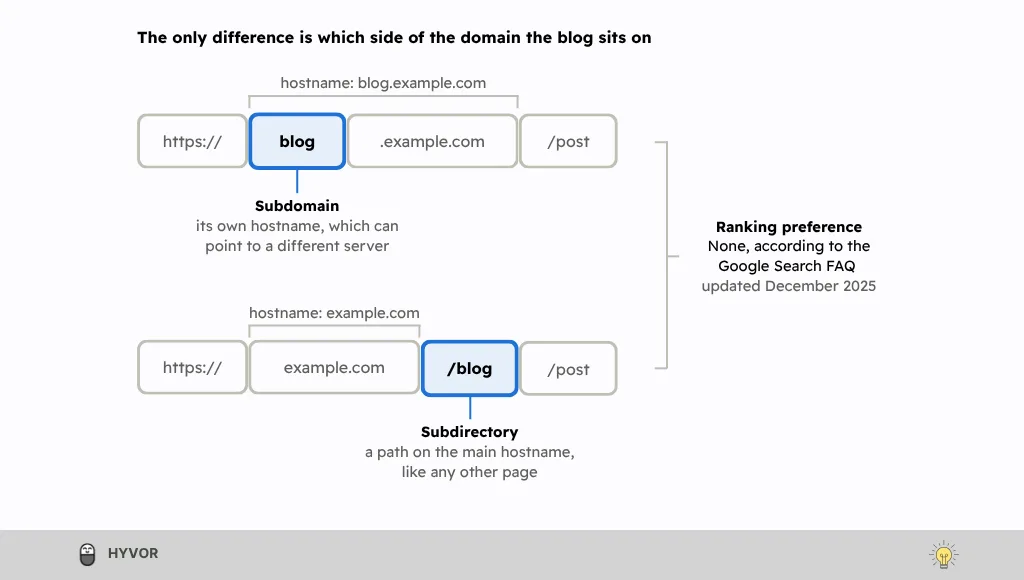
The word "blog" sits either to the left of the domain, as its own hostname, or to the right, as a path. Google ranks neither position higher.
Subdomain vs Subdirectory: Key Differences
Here’s how a subdomain vs subdirectory setup compares on the things you’ll deal with day to day:
Subdomain | Subdirectory | |
URL structure |
|
|
Hosting | Can point to any server or platform through its own DNS record | Served by the main site's server, or forwarded there by a reverse proxy |
CMS | Any CMS, independent of the main site | The main site's CMS, or a separate CMS behind a reverse proxy |
DNS | Needs its own record, usually a CNAME or A record | No new record; uses the main domain's |
SSL | Needs a certificate that covers the subdomain, or a wildcard certificate | Covered by the main site's certificate |
Content organization | A separate section with its own navigation by default | Part of the main site's hierarchy and navigation |
Internal linking | Links to and from the main site must be added on purpose | Shares the main navigation, so links come naturally |
Google ranking preference | None | None |
Search Console | Included in a Domain property; needs its own URL-prefix property for separate reports | Included in a Domain property; a URL-prefix property for the folder isolates its reports |
Analytics setup | GA4 needs no cross-domain setup if you use the same data stream | Measured with the main site by default |
Typical use | Apps, docs, help centers, staging, regional sites | Blogs, guides, resource hubs, product content |
Notice the ranking row. It's the one everyone asks about in the subdomain vs subdirectory debate, so let's look at what Google actually says.
Subdomain vs Subdirectory for SEO: Which Does Google Prefer?
In the subdomain vs subdirectory question, Google doesn’t universally prefer either structure. A subdirectory usually works better for content that supports your main site, because it shares the main site's links and navigation. A subdomain works better when the content needs its own platform, rules or team.
Does Google Prefer Subdomains or Subdirectories?
No. Google answers this directly in its crawling and indexing FAQ, under the question "Is it better to use subfolders or subdomains?" The page was last updated on December 10, 2025, and the answer is two sentences long:
"You should choose whatever is easiest for you to organize and manage. From an indexing and ranking perspective, Google doesn't have a preference."
Google's John Mueller has said the same for years, including in a 2017 video where he said "Google web search is fine with using either subdomains or subdirectories." The common misconception is that Google treats every subdomain as a completely separate website. At SearchLove London in 2018, as Brainlabs' write-up of the interview records, Mueller explained that Google tries "to figure out what belongs to this website, and sometimes that can include sub-domains, sometimes that doesn't include sub-domains." In other words, subdomain vs subdirectory is a flexible choice, so pick the structure that's easiest for you to manage.
How Do Crawling, Internal Linking, and Topical Authority Differ?
When it comes to subdomain vs subdirectory, Googlebot discovers pages the same way, by following links and reading sitemaps. The differences are in the housekeeping. Google's crawl budget guide says Google "defines a site as a unique hostname," so a blog subdomain gets its own crawl budget and needs its own robots.txt file and sitemap. Crawl budget only becomes a concern for very large sites, around a million pages, or 10,000+ pages that change daily, so most blogs never notice.
Internal linking is where subdomain vs subdirectory makes a real, practical difference. A blog in a subdirectory usually shares the main navigation, so posts, guides, and product pages link to each other naturally and build one connected topical cluster. A blog on a subdomain often runs on another platform with its own menu, and those links get forgotten: Sistrix's Johannes Beus couldn't find a path from the Guardian's main navigation to its teachers.theguardian.com subdomain. Whichever structure you choose, follow Google's link best practices and make sure every page you care about is linked from somewhere on your site.
Can Subdomains Cause Keyword Cannibalization or Duplicate Content?
Both structures can, but subdomains make it easier to do by accident. The classic case is the same post being reachable at both blog.example.com/post and example.com/blog/post, often after a half-finished migration. Another is two teams, one running the blog subdomain and one running the main site, publishing separate pages that target the same keyword.
The good news is that Google's guide to duplicate URLs doesn't describe a penalty. Google simply picks the version it thinks is best, which means you lose control over which URL appears in search. To keep that control, choose one canonical URL and redirect the others, which Google calls "a strong signal," then back it up with rel="canonical" tags and a sitemap that lists only canonical URLs. If two posts compete for the same search, merge them into one stronger page.
How Do Subdomains and Subdirectories Work in Google Search Console?
Search Console handles a subdomain vs subdirectory setup differently, but only for reporting. According to Search Console Help, a Domain property "aggregates data for all subdomains, protocols, and subpaths" and is verified through DNS. A URL-prefix property only includes URLs that start with its exact prefix, so it never includes other subdomains:
Property | Coverage |
example.com Domain property | All protocols, all subdomains and all paths |
https://blog.example.com/ URL-prefix | That subdomain, on that protocol only |
https://example.com/blog/ URL-prefix | That directory, on that protocol only |
Older articles say you must verify every subdomain separately, and some treat that as proof Google ranks subdomains as separate sites. For subdomain vs subdirectory, that’s a reporting choice, not a ranking signal. Use a Domain property to see everything in one place, then add a URL-prefix property for https://blog.example.com/ or https://example.com/blog/ when you want to monitor the blog on its own.
Does Subdirectory Depth Affect SEO?
Not directly. In 2018, Mueller said "we don't count slashes in the URLs," and that the number of clicks it takes to reach a page from the home page matters more, as Search Engine Journal reported. Google's own URL structure guide simply asks for URLs that are simple, logical, and readable, using words rather than long ID numbers.
So keep your hierarchy shallow enough for people to follow: /blog/post-name/ or /blog/topic/post-name/ is plenty. A path like /blog/2026/10/12/category/subcategory/post-name/ adds nothing a reader needs and makes future restructuring harder. More importantly, keep your best posts within a few clicks of the home page, through the blog index, topic hubs, and links from related pages.
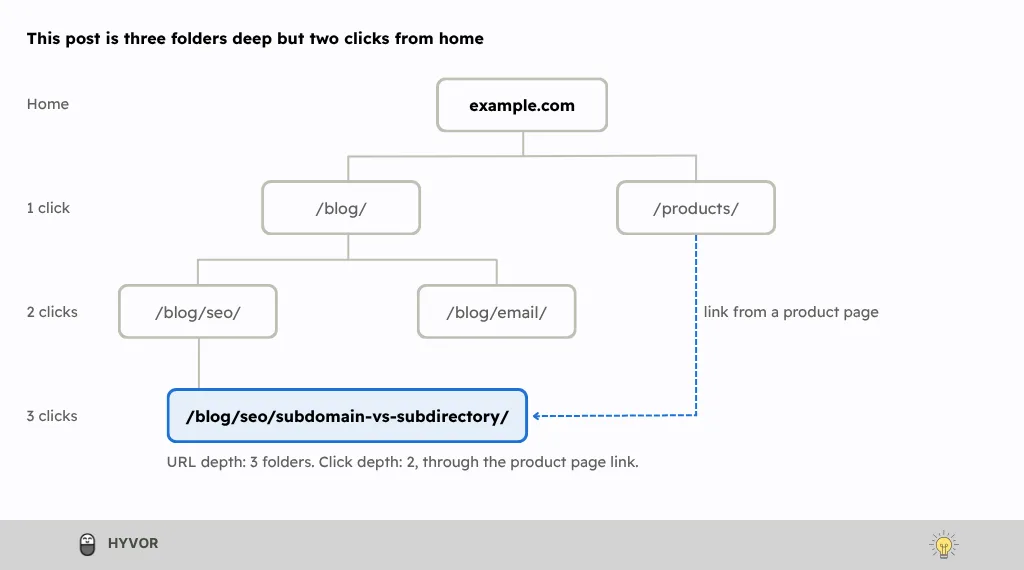
The post sits three folders deep, but a link from a product page puts it two clicks from home. That's the number Google cares about.
When Should You Use a Subdomain?
Use a subdomain when the content needs its own server, platform, access rules, or team, and can't sensibly run inside your main website. In the subdomain vs subdirectory decision, the reason should be technical or organizational, not a hope of extra rankings. In practice, three situations account for most good subdomains.
Independent Applications and Third-Party Services
Web apps, customer portals and APIs usually live on subdomains such as app.example.com or api.example.com, because they're deployed on their own schedule, run on different infrastructure, and need their own login and security rules. Many third-party services, such as hosted help desks, status pages, and community forums, only support a custom subdomain that you connect with a CNAME record. Most of these pages aren't meant to rank anyway, since a login screen or a dashboard has no search value. One caution: a subdomain is not a way around Google's rules. Its spam policies cover third-party content hosted mainly to borrow a site's ranking signals, wherever on the site that content sits.
Staging and Testing Environments
A staging subdomain such as staging.example.com lets you test changes on a separate hostname without touching your live site. Because robots.txt only applies to its own host, staging rules can't accidentally block production, but robots.txt also won't keep a staging site private. Google's guide to controlling what you share recommends password protection for private content, and notes that a noindex page can still be reached through links. So put staging behind a login. And when you launch, double-check that no staging noindex tag or Disallow: / rule was copied to the live site.
International and Regional Websites
International sites are the one case in the subdomain vs subdirectory decision where Google spells out the trade-offs in its guide to managing multi-regional sites. Regional subdomains like fr.example.com are easy to set up, allow different server locations, and keep each site easy to separate. Regional subdirectories like example.com/fr/ are just as easy to set up and need less maintenance on one host, but the sites are harder to separate later. With either option, Google notes that users might not recognize the targeting from the URL alone, so label every language or regional version with hreflang annotations in your HTML, HTTP headers, or sitemap.
When Should You Use a Subdirectory?
Use a subdirectory when the content serves the same audience as your main website and should guide readers toward its pages. That describes most company blogs, guides, and resource libraries, which is why subdomain vs subdirectory usually ends in favor of the subdirectory. It's also the structure John Mueller says he'd personally choose for related content, as Search Engine Journal reported in 2018.
Blogs, Resources, and Content Hubs
Educational content works best when it sits right next to the pages it supports. A blog at example.com/blog/, a glossary at /glossary/ and a guide library at /guides/ share one navigation, one design, and one set of analytics, so a reader can move from a how-to post to a related guide, or to your product, in a single click. That shared structure also makes topical clusters easy to build: a central guide links to every detailed post on the topic, and each post links back to it. You can build the same thing on a subdomain, but it takes deliberate effort; in a subdirectory, it happens by default.
Product Pages and Related Content
Product pages usually live in subdirectories such as /products/ or /features/, and their supporting content belongs close by. HubSpot, for example, serves its product pages under hubspot.com/products/, with paths such as /products/marketing and /products/crm. When comparison pages, use-case pages, and tutorials share that hostname, the commercial connection feels natural: a tutorial links to the feature it explains, and the feature page links back to the tutorial. You also get one set of reports showing which articles bring visitors who go on to view pricing or sign up.
Blogs Using an Independent CMS
You don't have to run your blog on your main site's CMS to use subdirectory publishing. With a reverse proxy, your main domain forwards every /blog request to a separately hosted blog platform and returns the page from your own domain, so readers and Google only ever see example.com/blog. Your content team keeps its own editor and publishing workflow, and your developers don't need to deploy anything when a post goes live. The one requirement is that the blog platform generates links, canonical tags, and sitemaps using the /blog path.
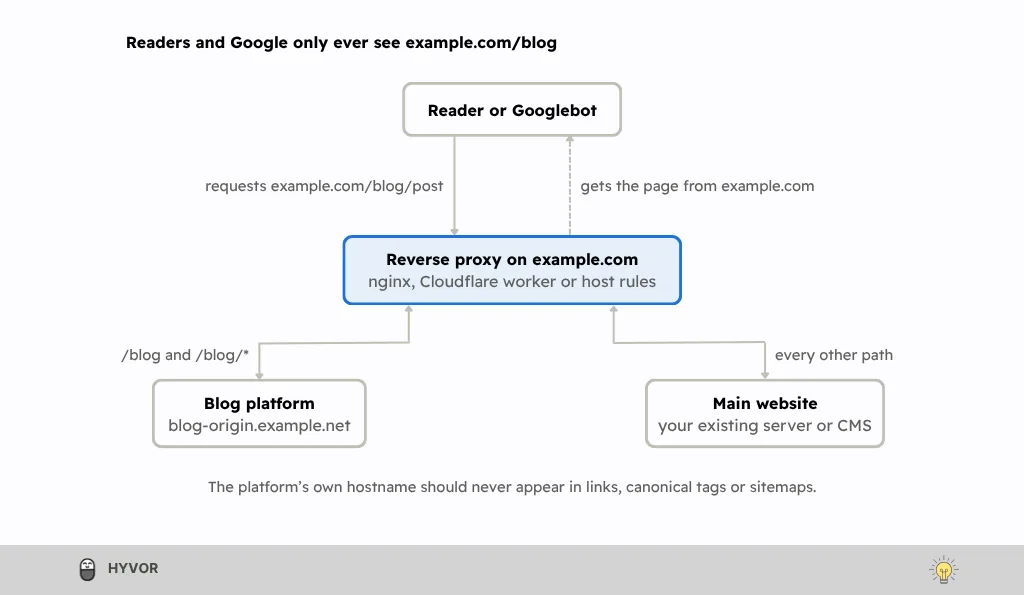
The proxy sends /blog traffic to the blog platform and everything else to your main site, so every page is served from your own domain.
How to Set Up a Subdomain or Subdirectory
To set up a subdomain, you add a DNS record that points it to your server or platform, then give it its own certificate, robots.txt file, and sitemap. To set up a subdirectory, you either create the path in your existing CMS or route it to a separate blog platform with a reverse proxy.
How to Set Up a Subdomain
Create the DNS record. Add a CNAME record pointing
blog.example.comto your platform's hostname, or an A record pointing it to your server's IP address, as your host instructs.Connect it to the platform. Add the custom domain in your blog or app platform, and make sure it issues a TLS certificate for it. Most hosted platforms do this automatically.
Give it its own robots.txt file and sitemap. Google treats a robots.txt file as valid only for the host it sits on, so the main site's file doesn't cover the subdomain.
Check Search Console. A Domain property already includes the subdomain. Add a URL-prefix property such as
https://blog.example.com/if you want its reports on their own.Use the same analytics setup. Install the same GA4 data stream as the main site, so a visit that crosses both counts as one journey.
Link both ways. Add the subdomain to your main navigation and footer, and link from it back to the relevant pages on your main site.
How to Set Up a Subdirectory
Use a native path if you can. If your main CMS runs the blog, create the
/blog/section there. No DNS or proxy work is needed.Set the public URL. If the blog runs on a separate platform, set its base URL to
https://example.com/blog/, so its links, canonical tags, and sitemap all use that path.Route the path. Forward
/blogand/blog/*to the platform with a reverse proxy, such as nginx, a Cloudflare Worker, or your host's rewrite rules.Fix redirects. Make sure any redirect the platform sends points to
/blogon your domain, not to the platform's own hostname.List the sitemap. Reference the blog's sitemap in the main site's robots.txt file, or submit it in Search Console.
Test it. Request a blog URL from the command line and confirm it returns a
200status from your own domain.
What About Analytics, Cookies, and Security?
Analytics: Subdomains of one domain don't need cross-domain measurement. As Simo Ahava explains, GA4 writes its cookies on the main domain by default, so every subdomain can read them, as long as they use the same data stream.
Cookies: According to MDN, a cookie set with
Domain=example.comis sent to every subdomain, while a cookie set without a Domain attribute stays on the host that set it.Subdomain takeover: If
blog.example.compoints to a hosted service you later cancel, and the DNS record stays, someone else may be able to claim that service and serve content on your subdomain. OWASP warns this can expose cookies scoped to your parent domain and enable convincing phishing pages.The fix: When you retire a service, update or remove its DNS record first, and delete the hosted resource only after that.
The subdirectory trade-off: A subdirectory avoids the takeover risk for the blog, because no separate DNS record points elsewhere. But a reverse proxy is one more system to maintain and monitor.
How to Move a Subdomain to a Subdirectory Without Losing Rankings?
To move a subdomain to a subdirectory without losing rankings, map every old URL to its exact new address, redirect each one with a single permanent redirect, and keep those redirects for at least a year.
Before you start, make sure a subdomain vs subdirectory move is worth it. Patrick Stox advises that you "think twice before changing from a subdomain to a subdirectory if the only reason you're doing it is for SEO," and Google's site move guide warns that rankings can fluctuate for a few weeks or more. If you go ahead, record your current traffic, top pages, and indexed pages as a baseline, and don't redesign the blog at the same time, or you won't know which change helped or hurt.
Map every URL. Pair each old URL with its exact new equivalent, such as blog.example.com/post-a/ to example.com/blog/post-a/. Pull URLs from your sitemap, analytics, and server logs, and include images and PDFs.
Prepare the new pages. Give each page a self-referencing canonical tag, and update internal links and menus to point at the new URLs instead of relying on redirects.
Redirect permanently, in one hop. Use server-side 301 or 308 redirects from each old URL straight to its new URL; Google says these "don't cause a loss in PageRank." Never send every old post to the blog home page, which Google may treat as a soft 404.
Update Search Console. A Domain property covers both locations; otherwise, add a URL-prefix property for each. Submit the new sitemap, and keep the old one for a while so you can watch old URLs drop out. [PLACEHOLDER: confirm in current Search Console help whether the Change of Address tool applies to a subdomain-to-subdirectory move. Google describes it for moves between domains or subdomains.]
Monitor for several weeks. Watch indexing, crawl errors, and search performance for both sets of URLs, and fix any redirect that returns a 404 or a chain.
Keep the redirects for at least a year. Google recommends a year as the minimum, and keeping them indefinitely is better for anyone following old links.
Subdomain vs Subdirectory: Which Should You Choose?
For most blogs and content hubs, a subdirectory is the right starting point. It keeps your content on the same site as your product, makes internal linking natural, and gives you one set of reports. Choose a subdomain when there's a concrete reason the content can't, or shouldn't, run on your main website. To settle subdomain vs subdirectory, work through three questions in order. If the content already ranks well on a subdomain, keep it there unless you have a reason beyond SEO to move. If it serves a different audience or needs its own app, team, or rules, choose a subdomain. If not, choose a subdirectory whenever your platform can serve it at /blog, natively or through a reverse proxy; otherwise, a subdomain is the simpler and safer choice.
Here’s how subdomain vs subdirectory plays out for common types of websites:
Website type | Recommended starting point | Main consideration |
Company blog | Subdirectory | Posts support product and service pages and share their navigation |
SaaS product marketing | Subdirectory | Feature, pricing and use-case pages should link to each other |
Multi-product content hub | Subdirectory | One hierarchy, such as /guides/product-a/, keeps related topics connected |
Educational resource center | Subdirectory | Readers move between guides and the main site without changing navigation |
Ecommerce content hub | Subdirectory | Buying guides should link straight to category and product pages |
SaaS application | Subdomain | The app deploys and scales separately, and doesn't need search visibility |
Customer portal | Often subdomain | Authentication, sessions and infrastructure are separate from the marketing site |
API services | Subdomain | Endpoints are deployed and versioned as their own service |
Staging environment | Subdomain | Testing must stay isolated from production, behind a password |
Third-party help desk | Depends | Many hosted help desks only support a custom subdomain |
Developer documentation | Depends | The docs platform, release process, and owning team decide it |
International website | Either | Separate teams or servers suit subdomains; one team on one host suits subdirectories |
Externally hosted blog | Either | Use a subdirectory if the platform supports /blog paths through a reverse proxy |
Treat these subdomain vs subdirectory recommendations as starting points, not rules. The deciding factor is your real requirements, which is exactly what Google's FAQ tells you to weigh.
Real-World Examples of Subdomains and Subdirectories
The biggest websites settle subdomain vs subdirectory by function, not by ranking theory, and they use both structures. Apps, documentation, and support centers tend to live on subdomains, while product pages usually sit in subdirectories. Blogs go either way: HubSpot runs one of the best-known marketing blogs on a subdomain, while Stripe keeps its blog at stripe.com/blog. Here's how some well-known sites split it.
Subdomain examples
Website | URL | Purpose |
HubSpot | Marketing, sales, and service blog | |
HubSpot | Product knowledge base | |
Developer documentation, including Search Central | ||
Help centers for Google products | ||
Microsoft | Documentation and training | |
Microsoft | Customer support | |
Stripe | Developer documentation | |
Mozilla | MDN Web Docs, a reference for web developers |
Subdirectory examples
Website | URL | Purpose |
HubSpot | Product page for its marketing software | |
Explainer on how Google Search works | ||
Microsoft | Microsoft 365 product pages, inside a locale folder | |
Stripe | Company and product blog |
Frequently Asked Questions About Subdomains and Subdirectories
Are Subdirectories Better for SEO Than Subdomains?
Not according to Google, which says it has no preference for indexing or ranking. Subdirectories often perform well because they share navigation and internal links with the main site.
Do Subdomains Share SEO Authority With the Main Domain?
Sometimes, because Google decides case by case whether a subdomain belongs to your main site. Google doesn't document how much site-level signal reaches any particular subdomain.
Can a Subdomain Rank as Well as a Subdirectory?
Yes. Google crawls, indexes, and ranks subdomains like any other URL, so a well-linked, crawlable subdomain can compete with any subdirectory.
Is a Subdirectory Better for a Blog?
Usually, if your platform can serve one. It keeps posts inside your main navigation and makes linking to product pages natural.
Can You Use Both Subdomains and Subdirectories?
Yes, and most large sites do. HubSpot, for example, keeps its blog on blog.hubspot.com and its product pages under hubspot.com/products/.
Does Moving a Blog to a Subdirectory Improve SEO?
It can, but it isn't guaranteed. Ahrefs describes two moves, mention.com and GitHub, with no lasting difference from the URL alone.
Final Verdict
Go back to the question at the start: blog.example.com or example.com/blog?
Google’s answer to subdomain vs subdirectory hasn’t changed in years. It has no preference, and it tells you to pick whatever is easiest to organize and manage.
So start with a subdirectory when the content belongs to your main website and your platform can serve it. Choose a subdomain for apps, staging, separate teams, or regional sites that need their own infrastructure, and then link it as if it belongs. And if your blog already lives on a subdomain that works, don't move it for SEO alone.
Whichever structure you choose, the structure is only the starting point. The content you publish and the links that connect it matter far more than which side of the domain the word "blog" sits on.