Gmail and Yahoo Bulk Sender Requirements for Newsletters
If your newsletter goes to Gmail or Yahoo addresses, the Gmail and Yahoo bulk sender requirements affect whether it reaches the inbox. They apply to every sender, with a stricter set of rules for anyone who sends in volume.
Yahoo began enforcing its rules in February 2024, and Gmail's requirements started the same month. One-click unsubscribe came later, with a June 2024 start at Yahoo and a June 1, 2024 deadline at Gmail for senders that already included an unsubscribe link. Since November 2025, Gmail has been "ramping up its enforcement on non-compliant traffic", according to its sender guidelines FAQ. Mail that falls short can be sent to spam or rejected.
This article covers who counts as a bulk sender, what each provider asks for, how authentication and one-click unsubscribe work, the spam rate limits, and how to check your own newsletter.
What Are the Gmail and Yahoo Bulk Sender Requirements?
The Gmail and Yahoo bulk sender requirements are two tiers of rules. Every sender must authenticate its mail and keep complaints low, and bulk senders must also pass DMARC and offer one-click unsubscribe.
Gmail publishes its rules in its email sender guidelines, and Yahoo in its sender best practices. The two overlap heavily, with a few differences covered below.
Who Counts as a Bulk Sender?
Gmail treats you as a bulk sender once you send close to 5,000 messages or more to personal Gmail accounts within 24 hours. Three details in its FAQ catch people out:
Only messages to personal Gmail accounts count toward the number.
Mail from your primary domain and its subdomains is counted together.
The status is permanent. Sending less later doesn't take you out of it.
Yahoo is vaguer. Its FAQ describes a bulk sender as one "sending a significant volume of mail" and says plainly: "We will not specify a volume threshold." It looks at senders "at the authenticated domain or From header domain level".
Here's how Gmail's count works in practice. Say you send 2,500 messages from example.com and 2,500 from news.example.com to Gmail users on the same day. Gmail counts 5,000 for example.com, so you're a bulk sender from then on.
If your list is small, it's tempting to stay under the line and skip the bulk rules. The deliverability consultancy Word to the Wise argues that volume isn't the real test: "You can't arithmetic your way out of having to comply." Yahoo publishes no number, and Gmail says bulk status never expires once it's assigned, so meeting the bulk requirements from the start is the lower-risk choice.
Requirements for All Senders vs Bulk Senders
Requirement | All senders | Bulk senders |
|---|---|---|
SPF or DKIM | At least one | Both SPF and DKIM |
DMARC record | Not required | Required, |
From domain aligned with SPF or DKIM | Not required | Required |
Forward and reverse DNS for sending IPs | Required | Required |
Message format | RFC 5322 (Yahoo also cites RFC 5321) | Same |
TLS connection | Required by Gmail | Required by Gmail |
Spam rate | Below 0.3% | Below 0.3%, and Gmail asks for below 0.1% |
One-click unsubscribe | Not required | Required for marketing and subscribed mail |
Visible unsubscribe link in the email | Recommended | Required |
Unsubscribes honored | Not required | Within 48 hours (Gmail) or 2 days (Yahoo) |
The rest of this article explains each row, starting with the places where the two providers part ways.
Gmail vs Yahoo: Where the Requirements Differ
The two providers ask for nearly the same things. They differ on the bulk threshold, the unsubscribe method and deadline, how the spam rate is counted, TLS, and complaint reporting.
Detail | Gmail | Yahoo |
|---|---|---|
Bulk threshold | Close to 5,000 a day to personal Gmail accounts | No number published |
One-click method | RFC 8058 HTTPS POST; a mailto: link doesn't qualify | RFC 8058 POST "highly recommended"; "the mail-to: method is acceptable" |
Unsubscribe deadline | 48 hours | 2 days |
Spam rate | Below 0.3%, with a target below 0.1%, as shown in Postmaster Tools | Below 0.3%, "calculated in our system based on mail delivered to the inbox" |
TLS | Required for all senders | Not listed |
Complaint reporting | Postmaster Tools | Complaint Feedback Loop (recommended) |
In practice, build to Gmail's version. An RFC 8058 one-click setup that removes readers within 48 hours meets Yahoo's rule as well.
How Do SPF, DKIM and DMARC Work Together?
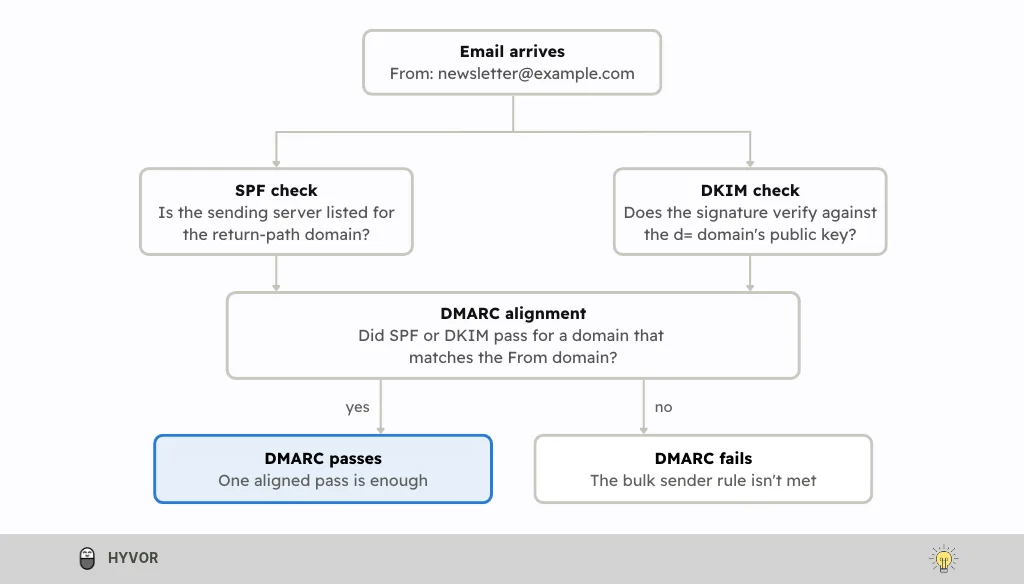
Authentication is the core of the Gmail and Yahoo bulk sender requirements. SPF lists the servers allowed to send for a domain, DKIM signs each message, and DMARC checks that at least one of them passes for the domain in your From address.
What Is SPF?
SPF (Sender Policy Framework) is a DNS TXT record that lists the servers allowed to send mail for a domain. The receiving server checks it against the SMTP MAIL FROM address, which shows up in the message as the Return-Path, the hidden address that bounces go to. It isn't the From address your readers see. When an email service sends for you, the return-path is often on the service's own domain.
An SPF record looks like this:
example.com. TXT "v=spf1 include:_spf.example.net ~all"
The record is illustrative. The include value comes from your email service. A domain can have only one SPF record, and a second one returns a permanent error. When you add a service, add its include to the record you already have.
What Is DKIM?
DKIM (DomainKeys Identified Mail) adds a signature to each message. Your email service signs with a private key, and the receiving server checks the signature against a public key you publish in DNS under a selector:
s1._domainkey.example.com. TXT "v=DKIM1; k=rsa; p=MIIBIjANBgkq..."
The signature's d= tag names the signing domain. When that's your own domain, DKIM can align with your From address, which is what DMARC looks for. Gmail requires a key of at least 1024 bits and recommends 2048. Your email service gives you the records to add, so you rarely write them by hand.
What Is DMARC?
DMARC (Domain-based Message Authentication, Reporting and Conformance) is a TXT record at _dmarc on your domain. It tells receiving servers what to do with mail that fails, and where to send reports:
_dmarc.example.com. TXT "v=DMARC1; p=none; rua=mailto:dmarc@example.com"
The policy has three settings:
p=noneasks for no action. You only get reports.p=quarantineasks receivers to treat failing mail as suspicious, usually by sending it to spam.p=rejectasks receivers to refuse failing mail.
Both providers accept p=none for bulk senders. Yahoo asks for "at least p=none" and adds that "DMARC must pass". A stricter policy protects your domain from spoofing, but neither provider requires it. The rua address receives aggregate reports, which show every server sending mail as your domain. DMARC's current standard is RFC 9989, published in May 2026, which replaced RFC 7489.
What Is DMARC Alignment?
DMARC passes only when SPF or DKIM passes for a domain that matches your From domain. That match is called alignment. Both providers require it for bulk senders, and Yahoo notes that "relaxed alignment is acceptable", and relaxed alignment is the DMARC default, so a subdomain such as news.example.com aligns with example.com. Strict alignment would need an exact domain match.
Here's a typical newsletter setup:
Check | Domain | Result |
|---|---|---|
From address | newsletter@example.com | The domain readers see |
DKIM signature ( | example.com | Passes and aligns |
SPF (return-path) | bounce.example.net | Passes, but doesn't align |
DMARC | example.com | Passes, through DKIM |
SPF passes for the email service's bounce domain, so it doesn't align. DKIM does, and one aligned pass is enough.
Gmail's FAQ recommends aligning both SPF and DKIM, and says both will likely become a requirement eventually. Bulk senders still have to configure both SPF and DKIM, but only one needs to align. If only one can align, make it DKIM. When a reader forwards your newsletter, SPF usually fails at the next server, while a DKIM signature usually survives unless the message is altered. Word to the Wise explains why SPF alignment matters less than people think.
What Is One-Click Unsubscribe and How Do You Set It Up?
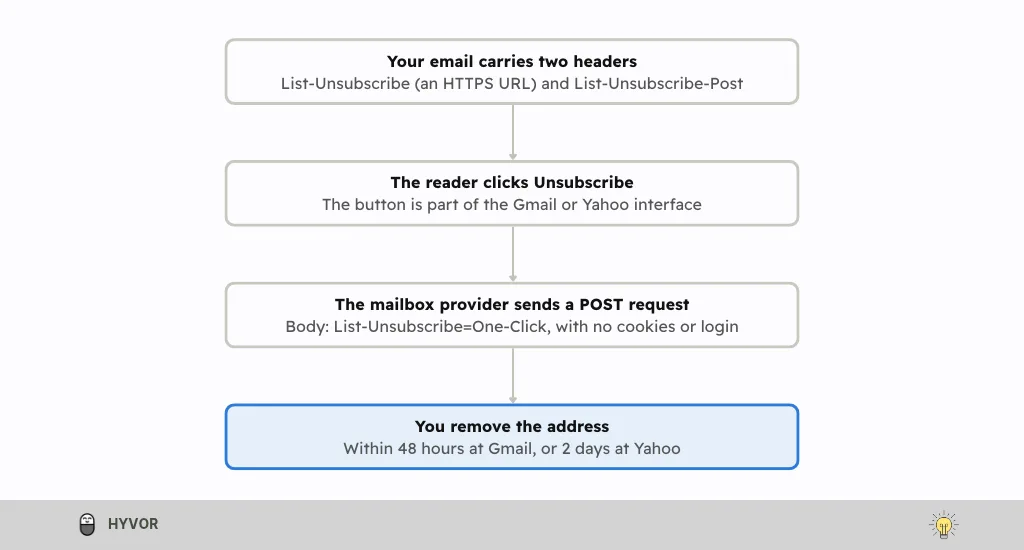
One-click unsubscribe is a pair of email headers that make you eligible for the Unsubscribe button Gmail and Yahoo show next to the sender name. Both show it only to senders that pass their own checks. One click on it removes the reader, with no web page to fill in.
One-Click Unsubscribe vs the Footer Link
Bulk senders need both. The headers power the button in the mailbox's interface, and the footer link stays in the body for readers who scroll down to it. A footer link on its own doesn't meet the rule, and at Gmail, neither does a mailto: address in the header.
Under the Gmail and Yahoo bulk sender requirements, the rule covers marketing and subscribed messages, so every newsletter issue needs it. Transactional mail is exempt. Yahoo's FAQ gives "order confirmations, password resets" as examples.
How to Implement RFC 8058
RFC 8058 defines one-click unsubscribe. Add two headers to every issue:
List-Unsubscribe: <https://example.com/unsubscribe/opaque-token-123>
List-Unsubscribe-Post: List-Unsubscribe=One-Click
When a reader clicks Unsubscribe, the mailbox provider sends a POST request to that URL:
POST /unsubscribe/opaque-token-123 HTTP/1.1
Host: example.com
Content-Type: application/x-www-form-urlencoded
Content-Length: 26
List-Unsubscribe=One-Click
The RFC says mailbox providers should send the body as multipart/form-data and may send application/x-www-form-urlencoded, which is what Gmail's own example uses. Accept both. The rest of the rules:
Use an HTTPS URL.
Put an opaque, hard-to-guess token in the URL that identifies the reader and the list.
Cover both headers with your DKIM signature.
Don't rely on cookies or a login. The request carries neither.
Don't answer with a redirect. Unsubscribe the reader and return a success response.
Security scanners sometimes open links in incoming mail. A GET request to your unsubscribe URL can show a confirmation page, but only the POST should remove anyone. Spam Resource walks through the common confusions.
If you send through an email service, check whether it adds these headers for you. Then confirm they appear in an email you've received, as shown in the example further down.
Honoring Requests Within 48 Hours
Gmail recommends that bulk senders process unsubscribes within 48 hours, and its enforcement table lists late unsubscribes as a reason to withhold delivery support. Its Postmaster Tools compliance status checks "Honor unsubscribe" separately from one-click support, so a working button isn't enough if the address keeps getting mail. Yahoo is just as firm: "If the unsubscribe is not honored in 2 days, then it would not meet the requirement."
Two habits keep you inside that window:
Give each list its own unsubscribe URL with a token that identifies both the reader and the list, and remove the reader from that list only, so leaving the newsletter doesn't also stop receipts or account emails. Google also advises a unique
List-IDor From address for each list.Test the whole path. Click Unsubscribe in a test inbox, then confirm that address is suppressed before your next send. Seeing the headers isn't the same as seeing the removal work.
When Postmaster Tools flags this check, Word to the Wise has a guide to what "Needs work" usually means.
What Spam Complaint Rate Do Gmail and Yahoo Allow?
Of all the Gmail and Yahoo bulk sender requirements, the spam rate is the one that moves daily, because Gmail calculates it every day. Keep it below 0.3% at both providers. Gmail also asks senders to stay below 0.1%, so treat 0.1% as your target and 0.3% as the line you never reach.
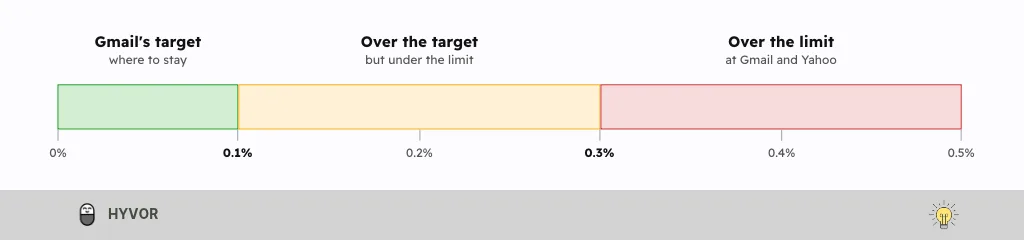
Gmail measures your rate in Postmaster Tools. If it goes above 0.3%, Gmail won't consider mitigation for your delivery problems until the rate has stayed below 0.3% for 7 consecutive days. Yahoo says its spam rate "is calculated in our system based on mail delivered to the inbox", so mail that already went to spam doesn't count toward the total.
A quick example: an issue reaches 10,000 inboxes and 20 readers mark it as spam. That's 20 / 10,000 = 0.2%. It's under the limit, but double Gmail's target. Your email service may divide by messages sent rather than delivered, so its number won't always match what the providers see.
Gmail's FAQ says unwanted messages without one-click unsubscribe are more likely to be reported as spam. These habits keep the rate down:
Use confirmed opt-in, so every address on the list asked to be there.
Say what you'll send and how often on the signup form.
Never buy, rent or borrow a list.
Remove addresses that hard bounce.
Keep the unsubscribe link easy to find. Readers who can't leave are more likely to click Report spam.
Re-confirm or remove readers who haven't engaged in a long time.
What Infrastructure Do All Senders Need?
Every sender needs valid DNS for its sending servers, correctly formatted messages and, for Gmail, an encrypted connection. If you send through an email service, it handles most of this for you.
Forward and reverse DNS. Each sending IP address needs a PTR record that maps it to a hostname, and that hostname has to point back to the same IP. Yahoo asks for "valid, meaningful, non-generic reverse DNS (PTR) records". On a shared email service, the IPs belong to the service, so this is its job, not yours.
TLS. Gmail requires senders to use a TLS connection when they deliver mail. Yahoo doesn't list it as a requirement.
Message format. Messages must follow RFC 5322, the standard for the internet message format, and Yahoo also cites RFC 5321, which covers SMTP. Email services build compliant messages for you. If you send from your own scripts, test them against the standard.
A From address on your own domain. Bulk senders need a DMARC record for their From domain, and you can only publish DNS records on a domain you control. A free gmail.com or yahoo.com address can't meet the bulk rules, so send your newsletter from an address such as newsletter@example.com.
What Does a Compliant Newsletter Email Look Like?
A newsletter that meets the Gmail and Yahoo bulk sender requirements shows three passes and the two unsubscribe headers. Here's an illustrative set for a newsletter sent from example.com and received at Gmail, trimmed to the lines that matter:
From: Example Weekly <newsletter@example.com>
Authentication-Results: mx.google.com;
dkim=pass header.i=@example.com header.s=s1;
spf=pass smtp.mailfrom=bounce@bounce.example.net;
dmarc=pass (p=NONE sp=NONE dis=NONE) header.from=example.com
DKIM-Signature: v=1; a=rsa-sha256; d=example.com; s=s1;
h=from:to:subject:date:list-unsubscribe:list-unsubscribe-post; ...
List-Unsubscribe: <https://example.com/unsubscribe/opaque-token-123>
List-Unsubscribe-Post: List-Unsubscribe=One-Click
List-ID: Example Weekly <weekly.example.com>
dkim=pass header.i=@example.com: DKIM passes for your own domain, so it aligns with the From address.spf=passfor bounce.example.net: SPF passes for the email service's bounce domain. It doesn't align, and it doesn't need to.dmarc=pass ... header.from=example.com: DMARC passes through the aligned DKIM signature.p=NONEshows the domain publishesp=none.h=...list-unsubscribe:list-unsubscribe-postin the DKIM signature: both unsubscribe headers are signed, as RFC 8058 requires.List-UnsubscribeandList-Unsubscribe-Post: the one-click pair, with an HTTPS URL.List-ID: names this mailing list. Your unsubscribe handler still has to keep it separate from your other mail.
To see your own, send an issue to a Gmail address you own and open it in Gmail on the web. Click the three-dot menu next to Reply and choose Show original. The full headers open in a new window, and the Authentication-Results lines show whether SPF, DKIM and DMARC passed. Yahoo has its own steps for viewing headers.
How to Meet the Gmail and Yahoo Bulk Sender Requirements
The Gmail and Yahoo bulk sender requirements are mostly a one-time job, and the order matters. DKIM matters most, because the one-click headers have to be covered by a DKIM signature, and a signature on your own domain gives you DMARC alignment.
Set up DKIM and SPF with the records your email service gives you. Check that the DKIM signature's
d=is your domain and that it signs both unsubscribe headers, and keep a single SPF record that includes every service that sends for you.List everything else that sends as that domain, such as your shop, help desk and CRM. Then publish DMARC at
p=nonewith anruaaddress. The reports will show you if you missed a sender.Send yourself an issue and open Show original. You want
dmarc=passand both unsubscribe headers. Then click Unsubscribe from that test inbox and confirm the address is gone within 48 hours. Keep the footer link too.Ask your email service about reverse DNS and TLS. It's usually their job, but it's worth a quick confirmation.
Add your domain to Google Postmaster Tools and join Yahoo's Complaint Feedback Loop, so you can see complaints as they come in.
How to Monitor Your Sender Compliance
To keep meeting the Gmail and Yahoo bulk sender requirements, use Google Postmaster Tools for Gmail and the Complaint Feedback Loop for Yahoo, and check your email service's reports after every send.
Postmaster Tools compliance status. Postmaster Tools shows whether your domain meets each requirement for all senders and for bulk senders, including "Honor unsubscribe". The dashboard reports primary domains only, using data from subdomains too, so you won't see a separate status for each subdomain. According to Google, the data typically updates within 24 hours, but after you fix something it can take up to 7 days for the status to change. Don't panic if a fix doesn't show the next morning.
Yahoo's Complaint Feedback Loop. Yahoo recommends that bulk senders enroll their DKIM signing domains. If you send through an email service, it will generally enroll your domain and process complaints for you, but confirm that with them. Once you're enrolled, you get a report each time a Yahoo user marks your mail as spam, so you can remove that reader before the next issue. Sign up through Yahoo's sender hub.
Your email service's reports. Watch bounces, complaints and unsubscribes for every send, and look into any sudden jump in volume. Open and click rates don't tell you whether you're compliant, so don't use them as a stand-in. A separate guide covers running a newsletter without open and click tracking and what to watch instead.
Common Compliance Problems and How to Fix Them
Here are five symptoms you may run into, what each usually means, and where to start.
SPF passes but DMARC fails. SPF passed for your email service's domain, not yours, and DKIM is either missing or signed with the service's domain. Set up DKIM with your own domain in the d= tag so it aligns.
Gmail doesn't show the Unsubscribe button. Check that both headers are present, the URL uses HTTPS and both headers appear in the DKIM signature's h= list. Valid headers alone don't guarantee it. Gmail's FAQ says the button appears only on messages that pass its automated eligibility checks, which cover the sender requirements, correct headers, gradual volume increases and recipients' spam reports.
Postmaster Tools says "Needs work" for Honor unsubscribe. Readers who unsubscribed are still getting mail after 48 hours. Check that one-click requests reach your list, that the removal happens before the next send, and that imports or integrations aren't adding removed addresses back.
Your spam rate is climbing. Look at what changed: a new signup source, a send to old addresses, or a jump in frequency. Pause that change, and make the unsubscribe link easier to find while the rate recovers.
Emails are delayed or rejected. Not every compliance problem ends in a rejection. Authentication, DNS, TLS and formatting failures can bring temporary or permanent errors, or spam-foldering. Problems such as a spam rate above 0.3% or missing one-click unsubscribe mainly cost a bulk sender Gmail's delivery support, and Gmail says missing one-click doesn't by itself get mail rejected or sent to spam. When Gmail does reject mail, it returns temporary (4.7.x) or permanent (5.7.x) error codes for mail that doesn't meet the requirements, and says unauthenticated mail might be rejected with a 5.7.26 error. Its FAQ lists the codes: 4.7.27 and 5.7.27 for SPF, 4.7.30 and 5.7.30 for DKIM, 4.7.31 for a missing DMARC record, 4.7.32 for a From domain that isn't aligned, 4.7.23 and 5.7.25 for a missing or mismatched PTR record, and 4.7.29 and 5.7.29 for no TLS. Read the text after the code in the bounce, since it names the reason.
Frequently Asked Questions About Gmail and Yahoo Bulk Sender Requirements
Do the requirements apply to small newsletters?
Yes. The all-sender part of the Gmail and Yahoo bulk sender requirements applies at any volume: SPF or DKIM, valid DNS, correct formatting, a spam rate below 0.3% and, at Gmail, TLS. The bulk rules start at close to 5,000 messages a day for Gmail, and Yahoo publishes no number, so most newsletters are better off meeting both.
What is Gmail's 5,000 email rule?
Gmail treats a domain that sends close to 5,000 or more messages to personal Gmail accounts in 24 hours as a bulk sender, and the status doesn't expire. The count is of mail sent to Gmail users, not from a Gmail account, and subdomains count toward the primary domain.
Does Yahoo have a 5,000 email limit?
No. Yahoo says, "We will not specify a volume threshold," and judges senders by their authenticated domain or From domain.
Does Gmail require SPF and DKIM?
Yes, in two tiers. Every sender needs at least one of them, and bulk senders need both, plus a DMARC record with a policy of at least p=none.
What are Yahoo's DKIM requirements?
Yahoo wants SPF or DKIM from every sender and both from bulk senders, with the From domain aligned to the SPF or DKIM domain. Its FAQ requires a DKIM key of 1024 bits or more and recommends 2048. It also recommends that bulk senders enroll their DKIM domains in the Complaint Feedback Loop.
Is one-click unsubscribe required?
Yes, for bulk senders, on marketing and subscribed messages at both Gmail and Yahoo. Transactional mail such as order confirmations and password resets is exempt.
Does the US CAN-SPAM Act require one-click unsubscribe?
No. The FTC's CAN-SPAM guide asks for a clear opt-out, such as a reply address or a single web page, honored within 10 business days, so Gmail's 48 hours and Yahoo's 2 days are the stricter deadlines to build to. The FTC says the law makes no exception for business-to-business email, and it is a US law, so check the rules where your readers live.
Can I send my newsletter from a Gmail address?
Not through an email service. Gmail treats a message with a gmail.com From address that wasn't sent from Gmail's servers as impersonation, and says bulk senders that do it get temporary failures. Send from an address on a domain you own.
Conclusion
Meeting the Gmail and Yahoo bulk sender requirements mostly comes down to four things: aligned DKIM, a DMARC record, one-click unsubscribe that removes readers within 48 hours, and a spam rate well under 0.3%. Most of that is a one-time setup with your email service. After that, the job is watching Postmaster Tools and your complaint reports, and acting when a number moves.
If you're still choosing a tool to send with, check its authentication and unsubscribe setup against this list first. Hyvor Post is Hyvor's own newsletter platform, and its launch post introduces what it does.
Before your next issue goes out, send a copy to a Gmail address, open Show original, and check for three passes and both unsubscribe headers.