Import
You can import subscribers from a CSV file to Hyvor Post. This is useful when you want to migrate your subscribers from another service or when you have a list of subscribers that you want to add to Hyvor Post.
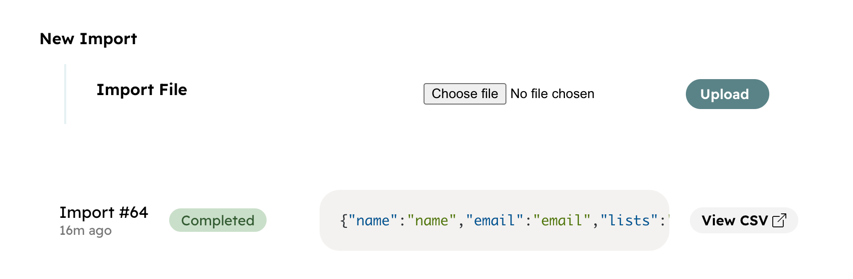
How to import
- Go to Console → Tools → Import.
- Upload your CSV file.
- Click Upload.
- Map columns in your CSV file into supported fields in Hyvor Post.
- Click Import.
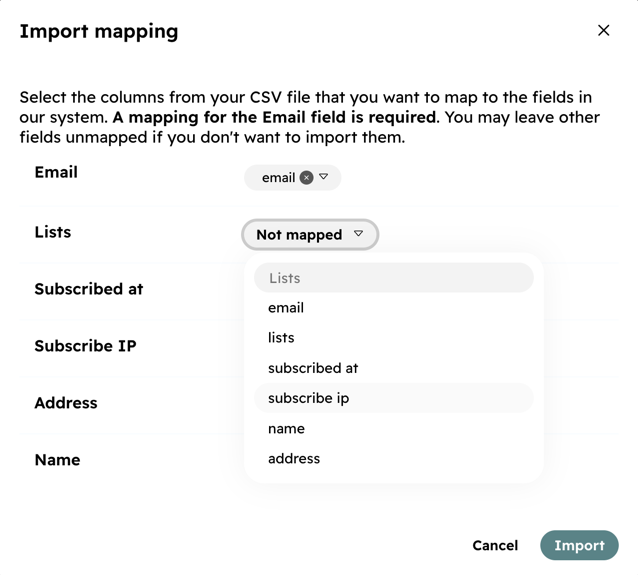
Your import will happen in the background. You can check the status of the import by refreshing the page.
Fields
You can find the supported fields in the table below.
Field
Description
Format
Required
Email
The email address of the subscriber.
stringYes
Lists
An array of list names that subscriber should be subscribed to. If unmapped, user will be
subscribed to all lists.
string[]No
Subscribed At
Timestamp when the subscriber was subscribed. If unmapped, current time will be used.
stringNo
Subscribe IP
Subscribed IP address of the user. If unmapped, it will default to
NULL.stringNo
Subscriber Metadata
You can map values to all Subscriber Metadata which you have defined in your console.
stringNo