Import from Sitemap
This method allows you to import blog posts from ANY PLATFORM assuming:
- All your posts have a similar HTML structure, and data can be extracted from the HTML using meta tags and, optionally, CSS selectors.
- Has a sitemap (XML or TXT) with all the URLs of your posts. If you don’t have a sitemap, you can easily use an online tool to generate one. Or, if you have a list of URLs in a TXT file, you can use that as well.
How it works
- Submit your sitemap (
.xmlor.txt) - Provide CSS selectors to help us extract data from your HTML pages
- Test your CSS against a couple of your pages to make sure data is correctly parsed
- Finally, import from the sitemap
Data that can be extracted
Our importer is capable of extracting the following data from your HTML pages:
<title><meta name="description"><meta property="article:published_time"><meta property="og:image">It does not support importing the following data:
- Tags - no tags will be added to posts
- Authors - the owner of the blog will be added as the author of all posts
CSS Selectors
Each blog has a different structure. Therefore, we need to know how to extract data from your HTML pages. You can provide CSS selectors for each data type.
For example, in this blog:
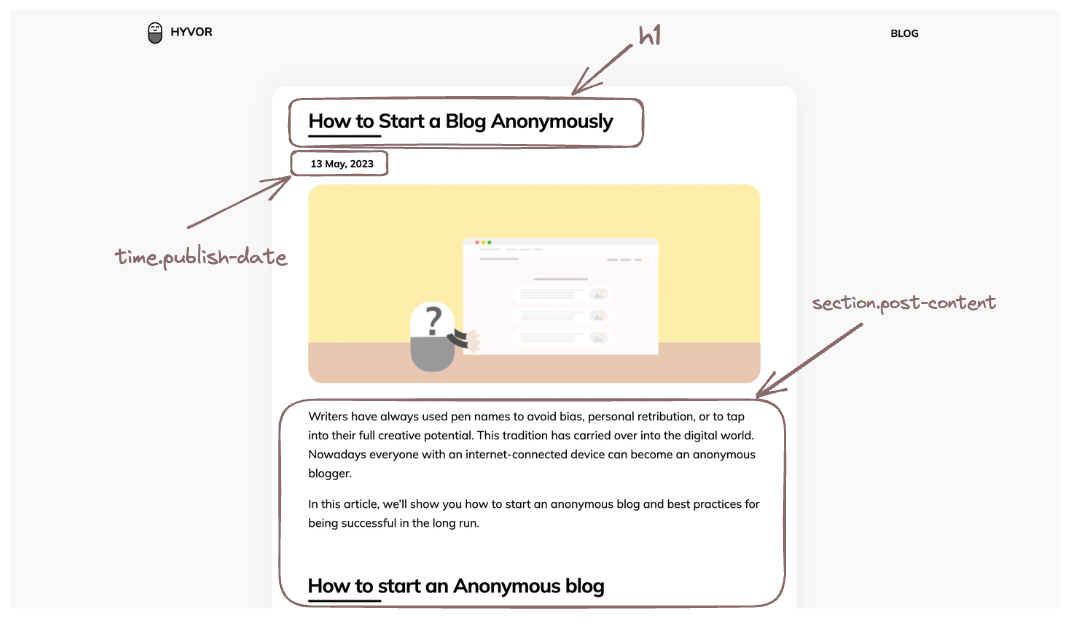
You can set the following CSS selectors:
- Post title:
h1 - Post content:
section.post-content - Post published date:
time.publish-date
Note that only the post content selector is required. Other selectors are optional. If you don’t provide a selector for a data type, we will try to extract it from the HTML page using meta tags as explained in the above table.
Content
The importer will automatically detect most styles (bold, italic) and blocks (paragraphs, blockquotes) from generic HTML tags.
It currently does not support importing the following block types:
- Link Bookmark
- Custom HTML/Twig
It has limited support for the following block types:
- Embed - We will try to import iframes as embeds (ex: Youtube embed). However, we cannot guarantee that it will work for all embeds.
Exclude content
You can exclude some parts of your content using CSS selectors. For example, if you have ads in your blog posts, you can exclude them by adding a CSS selector to Post Content Exclude:
.post-content > .adTo exclude multiple elements, separate them using a comma:
.ad, .newsletter-signupImporting images
If you are completely migrating to Hyvor Blogs, it is possible that images will no longer will be available in the original server. Therefore, we recommend you to import images to Hyvor Blogs. To do this, make sure to keep the Import Images on. Then, we will import featured images and all images in the post content into your blog media library. The image should be less than 50MB to be imported.
Test & Import!
Once you have provided all the required information, you can test your CSS selectors against a couple of your posts. If everything is fine, you can import all posts from the sitemap.
If you have any issues, feel free to contact us