Core Web Vitals for Publishing Sites: LCP, INP and CLS Fixes
A reader opens your article from search. The headline loads, but the featured image takes a beat to appear. They start the first paragraph, an ad drops in above it, and the text jumps down. They tap the menu and nothing happens. Core Web Vitals measures each of those moments, yet a failing report won't tell you where the problem starts.
Each problem has several possible causes, and each cause needs its own fix.
Why are my Core Web Vitals failing, and what should I fix first?
Find the failing metric, find its real cause, fix that cause, then confirm the result with real-user data. This guide walks through each step for publishing sites.
What Are Core Web Vitals? Metrics, Definitions and Thresholds
Core Web Vitals are three Google metrics, LCP, INP, and CLS, that measure loading speed, responsiveness, and visual stability on real visits. Google judges each one at the 75th percentile of page loads, separately for mobile and desktop. A page passes only when all three are good.
Here are the thresholds Google uses in PageSpeed Insights:
Metric | What it measures | Good | Needs improvement | Poor |
Largest Contentful Paint (LCP) | Loading performance | ≤ 2.5 s | 2.5–4.0 s | > 4.0 s |
Interaction to Next Paint (INP) | Responsiveness | ≤ 200 ms | 200–500 ms | > 500 ms |
Cumulative Layout Shift (CLS) | Visual stability | ≤ 0.1 | 0.1–0.25 | > 0.25 |
INP replaced First Input Delay (FID) in the Core Web Vitals on March 12, 2024.
What Is LCP?
Largest Contentful Paint measures how long the largest image or text block in the first screen takes to appear, not how long the whole page takes to load. On an article page, that's usually the featured image or the headline. Across the web, the LCP element is an image on 76% of mobile pages, according to the 2025 Web Almanac.
What Is INP?
Interaction to Next Paint measures how quickly the page shows a visual response after a tap, click or key press. It looks at interactions across the whole visit, not just the first one, so a slow mobile menu, table of contents, comment loader or article search can all hurt it.
What Is CLS?
Cumulative Layout Shift scores how much visible content moves unexpectedly while someone is on the page. The classic publishing example is an ad that loads above the paragraph someone is reading and pushes the text down.
Do Core Web Vitals Affect SEO?
Google uses Core Web Vitals in its ranking systems, but good scores alone don't guarantee high rankings, because relevance still counts.
Google's page experience guidance is direct about it: "Core Web Vitals are used by our ranking systems." The same page says "There is no single signal," and that Google "always seeks to show the most relevant content, even if the page experience is sub-par."
So the link is real, but limited. Treat Core Web Vitals as a way to find problems your readers actually feel, not as a score to chase. And because field data is a rolling 28-day record, a page that passes today can slip when a new ad partner or widget goes live.
Why Are Core Web Vitals Challenging for Publishing Sites?
Publishing sites mix editorial content with ads, shared templates and third-party scripts, and each of those can hurt a different metric. That's why Core Web Vitals for publishing sites take more work than they do on a simple marketing page: the problem is rarely one slow file. It's several components competing for the same first few seconds.
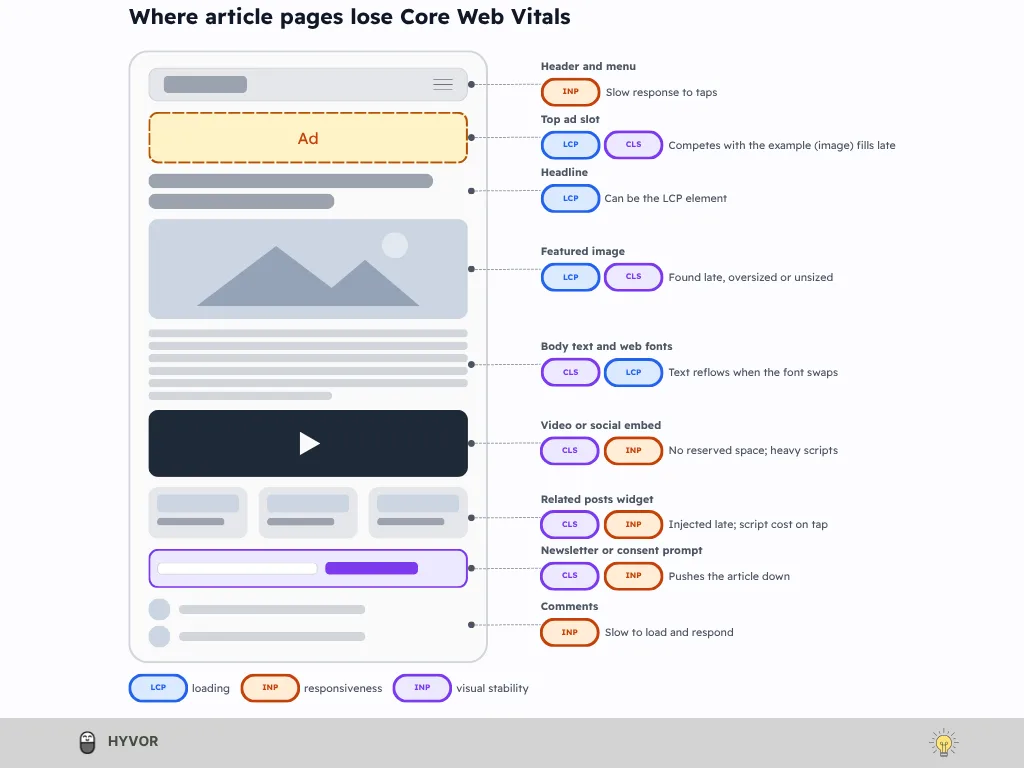
Image-Heavy Article Pages
Most articles open with a large featured image, and that image is often the LCP element. Trouble starts when it's oversized, served without responsive versions, or added by a script after the page loads, so the browser finds it late. Images also move the layout when they arrive without set dimensions, and 62% of mobile pages have at least one such image, according to the 2025 Web Almanac. Making the file smaller helps, but making sure the browser starts loading it early often matters just as much.
Advertisements and Consent Interfaces
Ads compete with the article for bandwidth and main-thread time, and an ad above the fold can become the LCP element or shove the layout around. Multisize ad slots make it harder, because the final size isn't known until the ad arrives. Google's own guide calls ads "one of the largest contributors to layout shifts on the web." Consent banners add another layer: German tech news site Netzwelt found that shifts from its consent dialog kept its real-user CLS above Google's threshold, even after other layout fixes (case study).
Third-Party Scripts and Interactive Widgets
Ad tags, header bidding, analytics, video players, social embeds, comment systems, recommendation widgets and newsletter prompts all come from outside your own code. Each one can use bandwidth, take main-thread time and change the layout after it loads. More than 94% of sites use third-party resources, with about 21 different third parties on average, according to Chrome's guide to third-party resources, a 2022 figure for the whole web. For video and social embeds, Google's third-party embed best practices are the place to start.
Reusable Templates and Content Management Systems
A publishing site runs hundreds or thousands of URLs on a handful of templates. One slow component in the article template, whether it's the header, sidebar, author box, related-posts block or newsletter form, slows every page that uses it. That's good news, too: fix the template and you fix all of those pages at once. So test your templates and shared components, not just the homepage.
How to Measure and Diagnose Core Web Vitals on a Publishing Site
Start with field data to see what real visitors experience, then use lab and browser tools to find the cause of the failing Core Web Vitals metric. Skip the first step and you can end up fixing a problem your readers never had.
Field Data vs Lab Data: What Is the Difference?
Field data comes from real visits on different phones, networks and interactions, collected over the previous 28 days. Lab data comes from a controlled test, which PageSpeed Insights describes as "a simulated load of a page on a single device and fixed set of network conditions." That's why a page can score well in Lighthouse while its real-user Core Web Vitals stay poor. Use lab tests to reproduce a problem and find its cause, and field data to learn whether readers are actually affected. Low-traffic articles may not have field data of their own, so PageSpeed Insights falls back to data for your whole origin.
Which Tools Should You Use?
Tool | What it's used for |
Search Console Core Web Vitals report | Finding groups of URLs with poor real-user performance |
PageSpeed Insights | Real-user data where it exists, plus Lighthouse diagnostics |
Chrome DevTools Performance panel | Investigating rendering, long tasks, slow interactions and layout shifts |
Chrome User Experience Report (CrUX) | The aggregated real-user data behind the two tools above |
Real user monitoring (RUM) | Your own field measurements, with more detail, if you've set it up |
The Search Console report groups similar URLs and gives each group the status of its weakest metric, so one failing metric is enough to flag a whole template. PageSpeed Insights may show origin-level data when an article doesn't have enough visits, and that average won't describe every article equally well.
Which Pages Should a Publisher Test First?
Test a small set that covers your templates:
Your homepage or main landing page
A standard article
An image-heavy or long-form article
A category or archive page
An article with ads, embedded media, or a comment widget
Test mobile and desktop separately, because Core Web Vitals are assessed separately for each. Include your most popular URLs and pages built on different templates.
How to Diagnose the Actual Bottleneck
Match the symptom to the first thing to check:
Symptom | First thing to investigate |
The LCP image starts loading late | Resource discovery, the network waterfall, loading priority |
The LCP image loads quickly but appears late | JavaScript, render-blocking resources, element render delay |
Taps and clicks feel slow | Long main-thread tasks, event handler time, rendering work |
The article shifts while ads load | Ad slot dimensions, layout changes, consent behavior |
Lighthouse and field data disagree | Device, network, interaction behavior and real-world conditions |
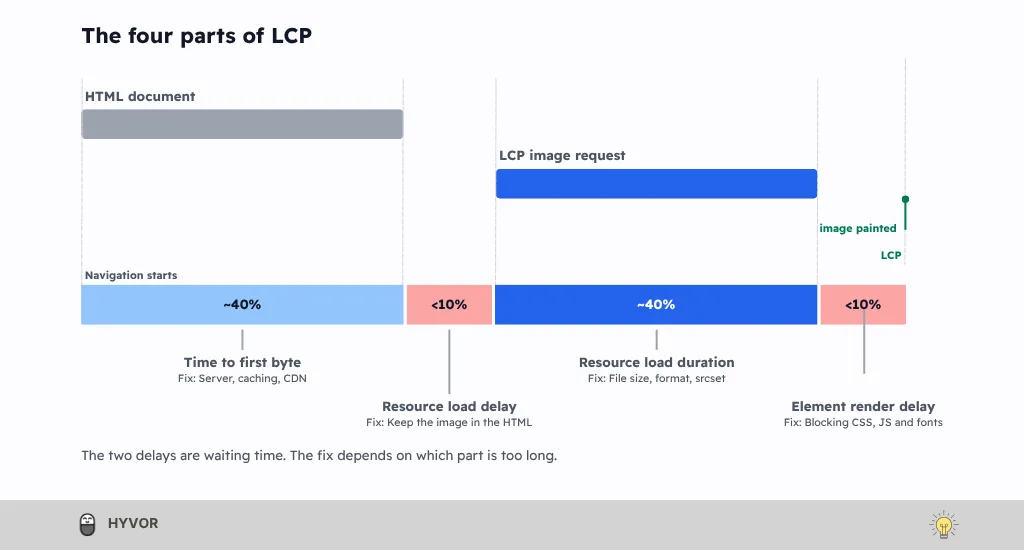
For LCP, go one level deeper. Google splits LCP into four parts: time to first byte, resource load delay, resource load duration, and element render delay. Its ideal split is roughly 40% for the first byte, 40% for downloading the resource, and under 10% for each delay, though Google calls these "guidelines, not strict rules." The Insights tab in the DevTools Performance panel shows this breakdown, so you can see which part is too long instead of guessing.
How to Fix LCP on Publishing Sites
To improve LCP, shorten the delay before the largest element appears. Like the other Core Web Vitals, LCP has no single cause: the right fix depends on which of the four LCP parts is slow.
Optimize the Featured Image and LCP Resource
First, confirm what the LCP element actually is; on some layouts it's the headline, not the image. If it is the featured image, serve it at the size it's displayed with srcset and sizes, compress it, and use a modern format such as WebP or AVIF. Keep it in the page's initial HTML so the browser finds it right away, instead of waiting for a script to add it. Then tell the browser it matters:
<img
src="example-1200.webp"
srcset="example-600.webp 600w, example-1200.webp 1200w, example-1800.webp 1800w"
sizes="(min-width: 800px) 800px, 100vw"
width="1200" height="675"
fetchpriority="high"
alt="Describe the image">
width and height let the browser reserve space before the file arrives, so the image can't shift the layout. srcset and sizes let the browser pick the right file for the screen. fetchpriority="high" asks the browser to fetch this image early. And there's no loading="lazy", because, as Google's Optimize LCP guide puts it, "Never lazy-load your LCP image."
Performance consultant Harry Roberts is blunter: "Lazy-loading your LCP is completely counter-intuitive. Please don’t do it!" Yet about 16–17% of pages still lazy-load their LCP image, according to the 2025 Web Almanac. Also avoid making the LCP image a CSS background image or building it with client-side JavaScript, since the browser finds both later than an image in the HTML: it has to process the CSS or run the script first. Add a <link rel="preload"> only when your diagnosis shows the browser is discovering the image late.
If you publish on Hyvor Blogs, uploaded PNG and JPEG images are converted to WebP automatically, and resized versions are offered so the browser can choose. Hyvor's docs put WebP files at 25–34% smaller than JPEG or PNG at the same quality.
Reduce Server Response Time
Before you blame the image, check time to first byte. In Google's ideal split, it takes about 40% of LCP, and on a slow server it can take far more. Cache pages and use a CDN where it fits, remove unnecessary redirects, and look at slow backend work. Server-side rendering or static generation suits article pages well, since the content rarely changes from one visitor to the next. Also check that query parameters or cookies aren't quietly stopping your pages from being cached. Hyvor Blogs, for example, renders each page on its first request and caches it, and for a blog hosted on a subdirectory, a Cloudflare Workers setup caches its images, CSS, JavaScript, and HTML on Cloudflare's network.
Reduce Render-Blocking Resources and Rendering Delays
Sometimes the image arrives quickly but still appears late. That points to element render delay: CSS, JavaScript, or fonts holding up the first render. Remove unused CSS and deliver the styles the first screen needs first, defer JavaScript the first screen doesn't need, and never hide the article until a large script has run. Check the fonts used above the fold, too.
Prevent Ads From Competing With the Main Content
Ads and the featured image fight for the same bandwidth in the first second. Check whether an ad has become the LCP element or is slowing down the example image, and put editorial content ahead of non-critical ad requests. Netzwelt, for example, moved its critical path ahead of its ad scripts (case study). Whatever you change, coordinate it with your consent setup, since ads often load only after consent.
How to Fix INP on Publishing Sites
Poor INP usually comes from JavaScript, main-thread work, and rendering delays during interactions, so fix it by reducing that work, not only load time. INP is the newest of the Core Web Vitals, and guides written before March 2024 may still describe FID instead.
Find the Interactions That Are Actually Slow
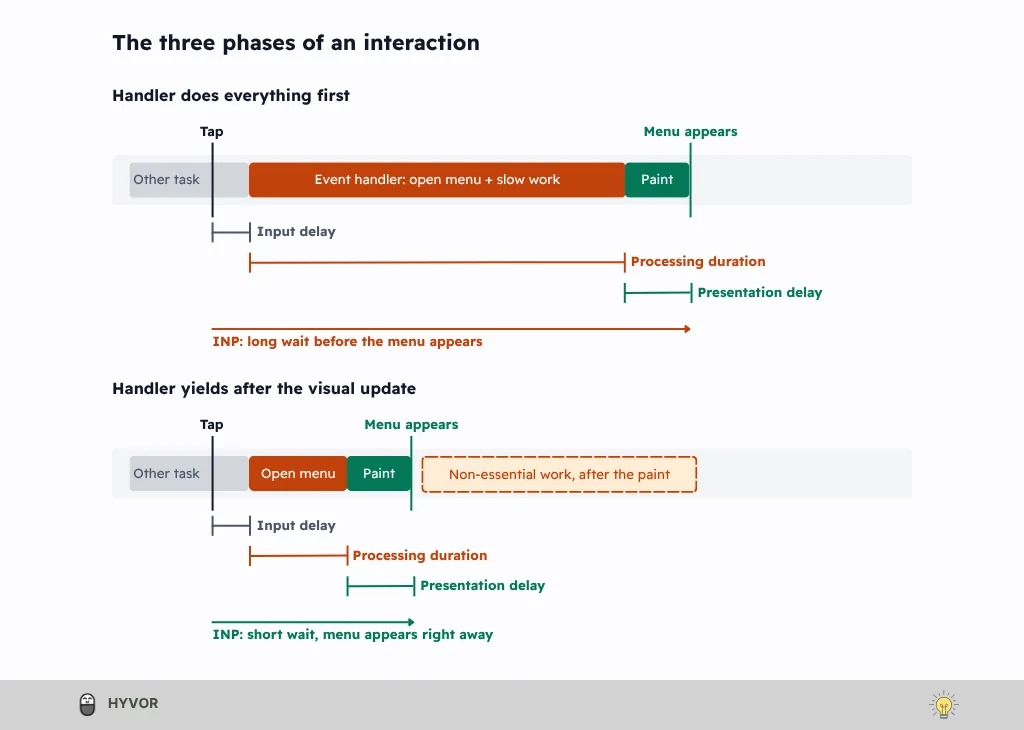
Start with real-user data to learn which interactions are slow, then reproduce them in the Chrome DevTools Performance panel. On a publishing site, the usual suspects are opening the mobile menu, expanding a table of contents, loading comments, searching or filtering articles, and submitting a newsletter form. Each interaction has three phases: input delay, the wait before your code starts; processing duration, the time your event handlers take; and presentation delay, the time until the next frame is painted. In the Interactions track, anything over 200 ms gets a red triangle, so the slow ones are easy to spot.
Reduce Long-Running JavaScript Tasks
The best general advice, in Google's Optimize INP guide, is to "do as little work as possible" in event callbacks. Remove JavaScript the page doesn't need, keep the immediate visual response light, move CPU-heavy work to a web worker where it fits, and avoid expensive DOM updates inside event handlers. When some work has to happen, break it up so the browser can paint in between. The pattern is simple: show feedback, yield to the browser, then do the rest.
const yieldToMain = () =>
globalThis.scheduler?.yield
? globalThis.scheduler.yield()
: new Promise((resolve) => setTimeout(resolve, 0));
async function onMenuClick() {
openMenu(); // immediate visual feedback
await yieldToMain(); // let the browser paint
sendMenuAnalytics(); // non-essential work
}
scheduler.yield() hands control back to the browser, then resumes your code with priority over other queued work. Chrome's scheduler.yield() guide recommends checking for it and falling back to setTimeout() where it's missing, which is why the wrapper includes one. That matters on Apple devices: MDN lists support in Chrome and Edge 129 and Firefox 142, but not in Safari. The fallback also yields, but it resumes at the back of the task queue, without the priority a native yield gives, so other queued work can run first. The work still runs, by the way. It just runs after the menu has visibly opened, and that visible response is what INP measures.
Audit Third-Party Scripts
List every ad, header-bidding, analytics, embed, comment, and recommendation script on your article template. Then decide which can be removed, delayed, loaded only when needed, or replaced with something lighter. Don't treat async and defer as a fix on their own: they change when a script loads, not how much work it does once it runs. The Economic Times, an Indian news site, lazy-loaded third-party libraries and moved heavy work to web workers, and its INP fell sharply (case study), while recommendation provider Taboola reworked its widget to break up long tasks (its reported INP gains are in the case studies below).
Optimize Article Templates and Interactive Components
Large DOM trees make every update slower, so trim client-side rendering and hydration an article page doesn't need. Google suggests keeping the DOM small and using content-visibility to skip rendering off-screen content. Load below-the-fold features like comments or related posts as the reader approaches them, and keep heavy non-essential work out of interactions. The Economic Times, for instance, rendered its menu items only on click, which removed about 1,200 DOM nodes. Finally, test on a mid-range phone, not just a fast development laptop.
How to Fix CLS on Publishing Sites
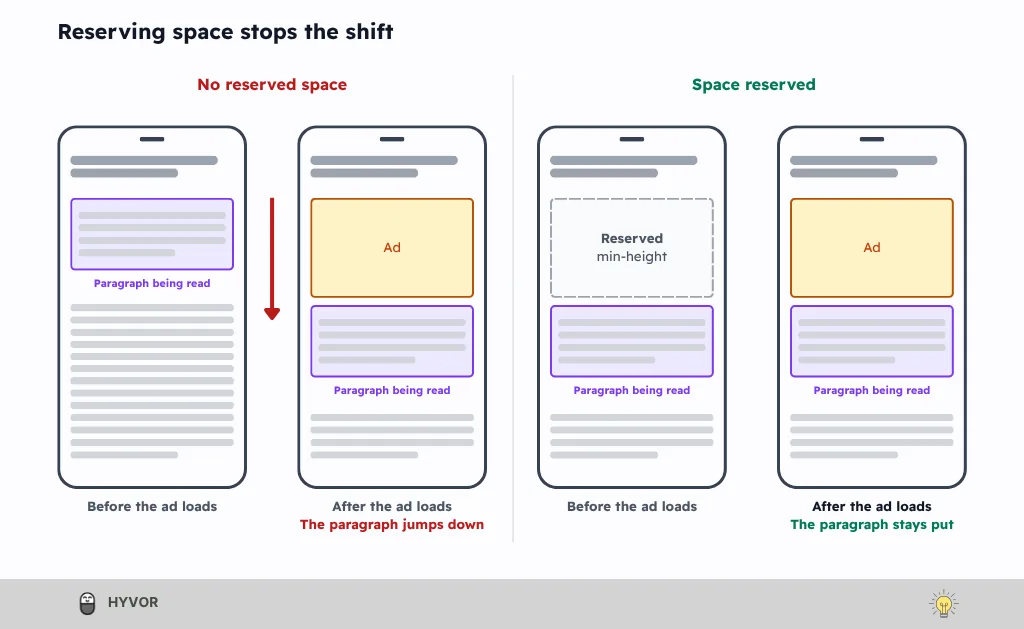
Improve CLS by stopping unexpected movement: reserve space for any element whose size isn't known when the page first renders. Among the Core Web Vitals, CLS is the one readers can see for themselves: it’s the text that jumps while they read.
Specify Dimensions for Images, Videos, and Embeds
Give every image width and height attributes, or reserve its shape with the CSS aspect-ratio property, so the browser knows how much room to hold before the file arrives. Do the same for video players and third-party embeds, and keep their proportions responsive instead of fixing one height for every screen. Here's the pattern for an image and an embed:
<img src="chart.webp" width="800" height="450" alt="Describe the image">
<div class="video-embed">
<iframe src="https://example.com/player" title="Video player" loading="lazy"></iframe>
</div>
img { height: auto; width: 100%; }
.video-embed { aspect-ratio: 16 / 9; }
.video-embed iframe { width: 100%; height: 100%; border: 0; }
The browser uses the width and height ratio to hold the image's space, while the CSS keeps it fluid. The aspect-ratio on the embed's container does the same for content that loads later. Google's embed best practices also recommend lazy-loading off-screen iframes and showing a lightweight preview, called a facade, until the reader clicks.
Reserve Space for Advertisements
Ads are harder, because one slot can serve several sizes. Google's Publisher Tag documentation is blunt: "The only guaranteed way to avoid layout shift is to reserve a sufficient amount of space for a given ad slot using CSS." It suggests reserving space for the largest size configured to serve, or for the size your fill data says is most likely, with a CSS min-height rather than JavaScript. Take special care with slots above the fold, and test what happens when an ad is slow, blocked, or never returned, because removing reserved space can cause just as much CLS as inserting content. The same guide warns that "fluid sized ads always cause layout shifts," so keep fluid ads below the fold.
There's a trade-off here between a stable layout and flexible inventory. Netzwelt reserved 250 px of height for slots that could serve 300×250 to 300×600 banners, which eliminated shifts for the smaller sizes and reduced them for the larger ones, and it dropped some of the largest sizes. Treat that as one publisher's tested compromise, not a setting to copy.
Prevent Dynamically Injected Content From Moving the Article
Newsletter prompts, related-article modules, recommendation widgets, consent banners, and subscription prompts all tend to appear after the page has rendered. Content injected near the top of the viewport usually causes bigger shifts than content lower down, so never insert anything above the paragraph someone is reading. Reserve space with a placeholder or skeleton, or show the element as an overlay that sits outside the document flow, and make sure any overlay stays accessible. Test each consent state, too: a consent dialog can keep shifting content in real visits even when lab CLS is near zero.
Reduce Font-Related Layout Shifts
Web fonts are nearly universal, with 87% of mobile pages using at least one, according to the 2025 Web Almanac. When the web font replaces the fallback, text can reflow and push the article around. font-display: swap alone doesn't stop that; Google notes that font-display: optional avoids the re-layout, because the web font is used only if it's ready at first layout. The more precise fix is a fallback font tuned to match, using the size-adjust, ascent-override, descent-override and line-gap-override properties from Chrome's font fallbacks guide. Network engineer Vincent Bernat used these overrides on his own blog and reports that his CLS improved to 0 after a month. Preload a critical font only when you have a reason to.
How Can Publishers Improve Core Web Vitals Without Sacrificing Ad Revenue?
Publishers can improve Core Web Vitals without losing ad revenue by fixing problem placements and testing alternatives, not by removing ads. The goal is to find the slots and scripts that hurt readers, then test better versions of them.
Optimize Ad Placement, Loading, and Layout Together
Load editorial content first, reserve space for every slot, and cut ad scripts and providers that don't earn their place. First-screen slots should load as fast as possible, while below-the-fold ads can wait "until they are close to entering the user's viewport," as Google's ad loading guide puts it. Track viewability and revenue alongside your Core Web Vitals, so you can see both sides of each change. Netzwelt reported gains in ad revenue and viewability after its relaunch, though its authors say the effects are hard to attribute to the relaunch alone (full figures in the case studies below).
Account for Consent and Subscription Interfaces
Consent banners, paywalls and subscriber checks can all change how a page loads, responds and holds its layout. That means one URL can behave like three different pages: before consent, after consent, and for a logged-in subscriber. Test each state before you decide a fix worked.
Measure the Business Impact of Performance Changes
Track performance next to the numbers your business runs on: ad viewability, revenue, page views, engagement, and subscriptions. Google describes one way to set this up: send field data to Google Analytics 4, link Ad Manager or AdSense, and compare the two in a Looker Studio dashboard. Chrome also added four experimental ad metrics to CrUX in September 2026, covering ad count, ad density, and ad weight. They're useful context, but in Chrome's words, they "are not part of Core Web Vitals and don't have suggested targets or thresholds."
Real-World Examples: What Can Publishers Learn From Core Web Vitals Optimization?
Publisher case studies of Core Web Vitals work show approaches and trade-offs, not guaranteed results. Every figure below is the publisher's own report, and each came from several changes shipped together, so no single fix gets the credit.
Publisher | What they worked on | Reported result |
Netzwelt (German tech news) | Ads, LCP, CLS and consent | Ad revenue +18%, page views +27%, viewability above 75%, bounce rate −50% |
The Economic Times, 2021 | LCP and CLS | LCP from 4.5 s to 2.5 s, CLS from 0.25 to 0.09, bounce rate −43% |
The Economic Times, 2023 | INP | INP from close to 1,000 ms to 257 ms |
Taboola (recommendation widget) | Its widget's effect on INP | INP improved 6% to 36% across four publishers |
Terra (Brazilian news portal) | Next-article loading | LCP −51% on mobile and −73% on desktop; ad click-through +11% and +30% |
Netzwelt: Optimizing a News Site Around Ads and Editorial Content
Netzwelt's relaunch is the most useful example here, because its problems touched all three metrics. Ads were competing with the hero image and fonts, so the team moved its critical path ahead of the ad scripts. For multisize slots, it reserved space, dropped some of the largest banner sizes, and lazy-loaded ads below the fold. Its consent dialog needed fixes of its own and still pushed field CLS above the threshold. One caveat: the work predates INP and measured FID instead, so take its ad, LCP, and CLS lessons, not INP evidence.
The Economic Times: One Fix for LCP and CLS, Another for INP
In 2021, The Economic Times moved to a faster DNS provider, optimized images, loaded critical requests first, and used styled placeholders to reserve space for ads and media. In 2023, it turned to INP by deferring non-critical work, lazy-loading third-party libraries, and rendering fewer DOM nodes, and on the topic pages it tested, bounce rate fell 50%, and page views rose 43%. Its final INP of 257 ms was a big improvement, but still above Google's 200 ms "good" line.
Terra: Faster Next-Article Navigation With Prefetching
Terra prefetched only the articles linked in its related-content and recommendation sections, not every link on the page. It used visibility, connection speed, and device memory to decide when to prefetch, and it measured the result with an A/B test before expanding it. The trade-off is extra bandwidth for pages a reader may never open. For the same goal today, Chrome's prerendering with Speculation Rules is worth a look.
Taboola: Fixing a Widget's Own INP Impact
Recommendation widgets are a classic third-party INP problem, and Taboola took it on from its side. It built a lighter rendering engine and a "Performance Fader" that splits up render-blocking tasks and yields to the main thread. Taboola reports that ad click-through rate and RPM weren't negatively affected by the change.
A Practical Workflow for Fixing Core Web Vitals
Fix Core Web Vitals in a loop: diagnose the failing metric, prioritize the highest-impact problem, validate each change in lab tests, then monitor real-user results.
Establish a baseline. Measure each key template on mobile and desktop, and note the URLs, current values, and field-data status in Search Console and PageSpeed Insights.
Identify the root cause. Use the metric's own breakdown, not a familiar trick: the four LCP parts, the three INP phases, or the layout-shift clusters in DevTools.
Prioritize. Weigh severity, affected pages, traffic, reader impact, and effort. A problem in a shared article template usually comes before an isolated low-traffic URL.
Implement and regression-test. Make one change at a time and test it on representative templates. For ad and consent changes, test each consent state and ad configuration too.
Validate and monitor. Confirm the change in lab tests, then watch the field data. Search Console tracks a fix over 28 days, so if the improvement doesn't appear, go back to step 2.
Before you call a Core Web Vitals fix done, check that you've:
Identified the LCP element and diagnosed its loading delays
Profiled the interactions behind a poor INP
Found the elements that cause CLS
Tested shared templates and important page variants
Compared lab results before and after each change
Monitored field data and business metrics after deployment
Common Mistakes to Avoid
Chasing a perfect Lighthouse score without confirming that real users have a problem.
Lazy-loading the LCP image, which delays the one image that matters most.
Preloading everything. Preload images, fonts, or scripts only when the diagnosis calls for it.
Assuming a fixed height solves every CLS problem. Responsive layouts need responsive space.
Treating async or defer as a complete fix for slow interactions.
Changing several things at once, so nobody can tell what worked.
Frequently Asked Questions About Core Web Vitals
What Is Considered a Good Core Web Vitals Score?
Google rates an LCP of 2.5 seconds or less, an INP of 200 milliseconds or less, and a CLS of 0.1 or less as good. It measures them at the 75th percentile of page loads, separately for mobile and desktop.
How Do I Pass the Core Web Vitals Assessment?
A page passes the Core Web Vitals assessment only when LCP, INP, and CLS are all in Google’s “good” range at the 75th percentile of page loads, measured separately for mobile and desktop. If it fails, find the failing metric first, then diagnose its root cause.
How Do I Check My Core Web Vitals?
To check your Core Web Vitals, use PageSpeed Insights for a page’s real-user data and lab test, and Search Console for groups of URLs. Then use the Chrome DevTools Performance panel to find why a metric fails.
How Do I Improve Core Web Vitals on a Blog?
To improve Core Web Vitals on a blog, test your main article templates, find the failing metric, and fix its root cause. Then check real-user data after you deploy, because a lab improvement doesn’t prove your readers see it.
Do Advertisements Affect Core Web Vitals?
Yes, ads can hurt your Core Web Vitals: they compete for bandwidth and processing time, and they can shift the layout. How much depends on how the slots are reserved, loaded, and displayed.
Why Are My Lighthouse Scores Different From Search Console Results?
Lighthouse runs one simulated lab test, while Search Console reports real-user field data for groups of URLs. They measure different experiences, so investigate the gap before you change anything.
Can Third-Party Scripts Cause Poor INP?
Yes, because they can take main-thread time and delay the response to taps and clicks. The effect depends on what a script runs and when, so find the slow interaction in DevTools first.
Are Core Web Vitals a Ranking Factor?
Yes, in part: Google says Core Web Vitals are used by its ranking systems, but “there is no single signal” and good results don’t guarantee a top ranking. It also says it always seeks to show the most relevant content, so the article itself still matters.
Final Verdict: A Core Web Vitals Checklist for Publishers
Each of the Core Web Vitals asks something different of a publishing site:
LCP: help the main content load and render quickly.
INP: make sure the site responds promptly when readers tap, click, or type.
CLS: keep the page still while ads, fonts, and embeds load.
The method is the same for all three: measure real-user performance, diagnose the root cause, fix what matters most, and validate the result. Then keep watching, because a new ad partner, widget, or template change can undo the work. Core Web Vitals are part of running a publishing site, not a score you fix once and forget.
So don't stop at the score. Find out what it's telling you.